Neopets Gender: Changing Your Pet’s Gender Explained

In Neopets, your pet’s gender—whether male or female—doesn’t significantly affect gameplay but plays an important role in customization and appearance. Certain clothing items or character themes may suit a specific gender better, which is why some players choose to change their Neopet’s gender. If you’ve decided to make the change, several methods are available, each with unique benefits, risks, and costs.

This guide dives deep into all the available methods to help you decide which approach works best for you and your Neopet.

change neopets gender


1. Using the Lab Ray for a Gender Change

The Lab Ray is one of the most popular ways to attempt a gender change because it’s included in the random effects when zapping your Neopet. However, using the Lab Ray requires unlocking it first by collecting and redeeming all nine pieces of the Secret Laboratory Map. These map pieces typically cost around 1.5 million Neopoints when purchased from other players’ shops or trades.

Once you’ve unlocked the Lab Ray, zapping your Neopet could result in:

  • Gender Change: Your Neopet switches from male to female or vice versa.
  • Species Change: Your Neopet turns into a completely different species.
  • Color Change: Your Neopet’s color changes unpredictably.
  • Stat Changes: Key stats such as strength, defense, and agility may increase or decrease.

Why the Lab Ray Is Risky
The Lab Ray is a double-edged sword, especially if you’re zapping a prized pet. While it might successfully change your Neopet’s gender, it could also result in undesirable changes to their color, species, or stats. For example, zapping a Royal Girl Cybunny could accidentally turn it into a Blue Moehog or reduce its battle stats, which can be frustrating if you’ve spent significant resources training your Neopet or customizing its appearance.

Is It Worth It?
Using the Lab Ray for a gender change is best suited for players who don’t mind taking risks or who have less sentimental attachment to the Neopet in question. If your pet is already rare, highly customized, or carefully trained, this method may not be the best choice.


2. Battling the Lab Ray Scientist

Another method involves facing off against the Lab Ray Scientist in the Battledome. To unlock him as a challenger, you must redeem the full Secret Laboratory Map, which is the same requirement as accessing the Lab Ray. Once unlocked, the Lab Ray Scientist may appear in the Battledome.

How the Gender Change Works in Battle
The Lab Ray Scientist wields a Strange Potion, which he sometimes uses during battles. If your Neopet is hit by this potion, its gender will automatically switch:

  • Male Neopets will become female.
  • Female Neopets will become male.

Importantly, this gender change occurs regardless of whether you win or lose the battle. However, the Lab Ray Scientist doesn’t use the Strange Potion in every match, so it might take several battles before your Neopet’s gender is changed.

Why This Method Is Popular
Battling the Lab Ray Scientist is a cost-effective method for players who enjoy Battledome combat or don’t have the Neopoints to buy a Strange Potion outright. Additionally, it avoids the broader risks of zapping, such as species or color changes.

Things to Keep in Mind
To use this method, you’ll need to battle with a Neopet from your main account, as Lab Map redemptions are restricted to main accounts only. Attempting to profit from side accounts by moving pets or maps between accounts could lead to warnings or account freezes.


3. Using a Strange Potion Directly

For a guaranteed gender change without the risks of zapping or battling, you can purchase a Strange Potion from other players. Using this item on your Neopet will instantly change its gender with no additional effects.

Pros:

  • No risk of altering your Neopet’s species, color, or stats.
  • Instant results without needing multiple attempts.

Cons:

  • High Cost: Strange Potions are among the priciest items in Neopets, with prices ranging from 1 million to 2 million Neopoints. This method is best suited for players with a healthy Neopoint budget.

4. Morphing Potions or Witchy Neggs

Another option for changing your Neopet’s gender is to use specific items with gender-altering effects.

Morphing Potions

Some Morphing Potions, such as the Royal Boy Kyrii Morphing Potion or Royal Girl Kyrii Morphing Potion, will change both your Neopet’s species and gender. While effective, this method sacrifices your pet’s current species, making it less appealing for players attached to their Neopet’s original form.

Witchy Neggs

Witchy Neggs are another potential option, but they come with significant risks. In addition to changing gender, a Witchy Negg may:

  • Change your Neopet into a different species, such as a Moehog, Lenny, or Tuskaninny.
  • Alter your Neopet’s intelligence by increasing or decreasing points.

Witchy Neggs are highly unpredictable, so they’re only recommended for players willing to accept the potential downsides.


5. Historical Methods: Cape of the Sun

In the past, the Cape of the Sun item could change a Neopet’s gender when equipped. However, this functionality was a glitch and has since been fixed by The Neopets Team (TNT). The Cape of the Sun no longer affects gender, making it purely cosmetic today.


6. Effects on Unconverted and Royal Pets

Changing a Neopet’s gender can have unique effects depending on its type:

Unconverted Pets (UCs)

Unconverted Neopets (pets that existed before the April 2007 customization update) retain their original artwork regardless of gender changes. This means you can safely change the gender of an unconverted pet without altering its rare design.

Royal Pets

Royal pets undergo subtle cosmetic changes when their gender is altered. For example:

  • Male Royal pets may gain fluttery eyelashes when changed to female.
  • Female Royal pets may lose their eyelashes when changed to male.

However, clothing and other gender-specific designs will remain tied to the pet’s original form, even after a gender change. For instance, a Royal Girl’s outfit won’t automatically convert to a Royal Boy’s attire if the gender is changed.


What’s the Best Method to Change Gender?

Choosing the right method depends on your priorities:

  • For guaranteed results and no risks: Use a Strange Potion.
  • For a budget-friendly option: Battle the Lab Ray Scientist.
  • For a thrill of randomness or multitasking: Use the Lab Ray.
  • For a gender change and species swap: Consider Morphing Potions.

Ultimately, if you have a cherished or rare pet, it’s best to avoid risky methods like the Lab Ray or Witchy Neggs. However, if you’re experimenting with a less valuable pet, these options can be both exciting and cost-effective.

Changing your Neopet’s gender can be a fun way to further personalize your virtual companion, but it’s essential to choose the method that aligns with your goals and budget!


Last updated: 12/15/2024

Neopets Birthday Recovery

Has it been years since you’ve logged into Neopets? Have you lost your neopets birthday used? Were you too young to play without your parent’s consent, was a fake birthday used when you signed up? Are you unable to remember what birthday you used to create your account? If you’ve finally given up guessing after getting locked out of your account for trying to guess your birthday too many times, fret no longer! Here at Neopets-Cheats we have a great solution. We can help you figure out the birthday to your old Neopets account, that you lost the birthday to!

Neopets Lost Birthday

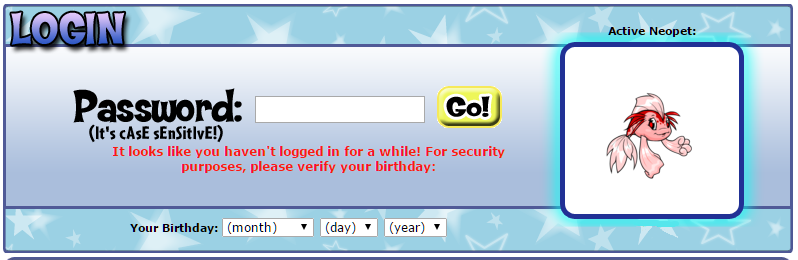
There are a couple reasons you might need to know the neopets birthday that you used when you signed up. It could be to recover a frozen account, or to just log in normally. Unfortunately, most people who started playing Neopets when they were younger have experienced the trouble of getting birthday locked out of their account. It sucks, especially if you don’t have access to your old e-mail. Many that have lost their Neopets birthday, think it’s a lost caused, however, that is not the case. If you’ve recently logged in for the first time in a long time, you may see a prompt that says, It looks like you haven’t logged in for a while! For security purposes, please verify your birthday:

Neopets Birthday

If this has happened to you, we can help you out. All you have to do is give us your username. That’s it. After that, you will recieve your birthday instantly, assuming of course a staff member is online (if not, then within 12 to 24 hours).

Lost Neopets Birthday Price

The price for this service is only $10! In addition, if you’d like to make bulk purchases, discounts can be arranged. Paypal is the preferred method of payment.

Forgot your Neopets Account Birday? Contact Us

Email us today at support@neopoints.in

Is Neopets Down for You or Everyone?

It’s a beautiful day outside, the birds are singing and the sun is bright high in the sky. You wake up feeling refreshed and determinate how you will spend this beautiful day: playing Neopets until 3:00am. Your turn on your computer, you go to www.neopets.com and then the worse happens… NOTHING. You ask yourself, is Neopets down. If so, is Neopets down for me, or everyone?

It doesn’t load, or it takes too much time to load and eventually the connection is lost. No clear signs of it being down, no crying bright Red Pteri welcoming you with the terrible message “Neopets is temporarily offline”, nothing at all… and you clearly start to panic. What to do? Is this just me or is my internet connection? So many questions, but no answers.

Stop! Don’t panic! I’m here to help you! The first thing you need to do is to go to check if the site is really down or not. For this, you can use some pages like DownForEveryoneOrJustMe, IsItDownRightNow or CurrentlyDown – You’ll see a little space where you need to write the name of the domain that you want to check. In this case, you’ll have to type in ‘neopets.com’ without the www or http. The page will take a couple seconds to load and get the data from the site, and it will show you the result.

You’ll either get a page saying that the site is currently down, or if the site is up.

What to do if Neopets is down for everyone?

Looks like the site agreed and noticed that Neopets is down for everyone. Websites go “down” for a number of reasons. They may be doing maintenance on the site, or the server it’s on may be having problems and had to be reset. Usually, TNT will let the community know beforehand when the site will be in maintenance by publishing it on the news, like the followed example:

“ATTENTION NEOPIA – Please be aware that Neopets.com may experience occasional downtime due to scheduled maintenance by our server providers between 8:00 AM Tuesday, Jan 12 – 8:00 AM Friday, Jan 15 NST/PST. During this time you might find the site unavailable, so any further updates from TNT can be found on our official Facebook or Twitter. Sorry for any inconvenience this might cause!”

Is Neopets Down

So a good way to not be surprised when the game is down, is to check the News often. If you forgot to check the news recently, and Neopets is not working, you should check their Facebook or Twitter page in order to see if they have announced anything related to this. At the same time, you’ll be able to check if anyone else has commented about sharing the same issue on their pages, which will also help you to make sure that is indeed a general down time that the site is suffering.

Now, the only thing that is left to do is waiting for Neopets to get back up, which might take minutes or hours. You can get updated by checking the official Neopets social network pages or, by just refreshing the site once in a while.

What to do if Neopets is up but it won’t load for me?

If all the sites that check if a site is down or not, are telling you that Neopets is running without problems, then there is something bad in your side… which might be a little bit more problematic, but don’t worry, there are things you can do to try to fix this problem. First things first: are you using an internet connection in which you’ve successfully enter Neopets in the past? You are sure that Neopets is not blocked in your computer or that you’re not using a public connection that blocks sites of games? (That last thing is pretty common in schools for example).

Is Neopets.com Down

If you are sure you should be able to get inside Neopets, try deleting the cookies of your browser. This is pretty helpful and tends to work most of times when a problem like this pops up. You don’t know how to do this? Then check the instructions for the browser you are using below:

1) Internet Explorer: Start by entering the browser, go to Control Panel and click twice in Internet options. You’ll see a ‘Delete temportal files’ under the general tab, which you’ll need to click and then select the ‘cookies’ option when the popup window appears. Delete, wait a few seconds and it will be done.

2) Firefox: Click on the Firefox button, select Options and go to Privacy. After this, select the ‘Show Cookies’ button which will appear on the right side. Select the History menu and pick out ‘Clear Recent History’, make sure you select to delete everything. Go to the details by clicking on the arrow and Clear all cookies. Might take a few seconds to load as well, just let it run.

3) Chrome: Start by clicking on the Settings and then ‘Show advanced settings’ which will appear by the bottom. Under ‘Privacy’ click on ‘Content Settings’, and then click on ‘Cookies’, redirecting yourself towards ‘All cookies and site data’. Select to Remove them All.

4) Safari: Click the Safari preferences, going then to ‘Privacy’ and check their Details. You will see a list of sites that are storing cookies inside your computer and you can remove single sites by clicking the ‘Remove’ button and selecting a site or to ‘Remove All.’ Finish the process by clicking on ‘Done’.

5) Opera: Go to the ‘Settings’ at the top of your browser and then select Advanced Preferences, which will give you an option to click on ‘Cookies’. Here you can accept all cookies, accept cookies only from sites you visit, and never accept cookies. The best choice would be to accept cookies only from sites you visit. Finally click on ‘Delete new cookies when exiting Opera’ and restart the browser.

After cleaning the cookies of your browser, close it and open it again. If Neopets still doesn’t load for you, try a different browser and if the process repeats itself, then move to this steps: Check all I/O cables, including those attached to your PC, router, network, and cable or DSL modem. If you’re on a wireless connection, try plugging in with a cable. Next, try restarting your computer and, if applicable, your router and/or modem. Restart, not reset: just unplug them, wait 30 seconds, then plug them back in again and let them reboot.

Is Neopet Down

If nothing of this works, then the problem might be a little bit deeper. Consider sending a mail to support@neopets.com telling them about your bug report. Most likely they will be able to tell you if there is anything wrong with your current connection to the game.

If you have done some major ilegit activities inside Neopets you might have been IP banned from the site. If you want to check if this is true, change your IP by using Incognito mode in Chrome (easiest way in case you don’t want to download a program that does it for you) and if the game does load in Incognito mode, then you are most likely IP banned. If this is correct, all what is left is to send a ticket to the same mail shared before, or to just continue playing the game with a new IP by using a VPN.

I hope this guide was helpful in order to inform yourself and fix your problem! Happy playing!

Last updated: 12/14/2024

Buy Neopoints

Buy Neopoints instead of playing Neopets games on hours and hours,  while only earning the ridiculous amount of 50k? Are your goals in Neopets very far from your reach only for your incapacity of making Neopoints fast and in good amounts? Or is your dream becoming a Neomillionare to fulfill all your dreams and your friend’s wishes? If you replied to any or all of this questions with a ‘yes’ then I tell you: there is no reason to suffer, no reason why you should wait either! Just buy neopoints and all your problems will be gone! Is one of the most simple, easiest and safe ways of cheating, something that has been happening for years already and the success rate is very high.

https://neopets-cheats.com/wp-content/uploads/2016/01/large_83.png

But I’m sure that you must be having a lot of questions about this, and probably, even fear of doing something wrong or getting scammed by somebody else. Don’t worry at all, because there’s where this guide comes to play! Just keep reading and you’ll be an expert on how it works to buy Neopoints, which are the safest ways of getting them, and which are the things that you should do, and which ones you need to avoid.

Where to Buy Neopoints Online?

The first question that comes to people’s mind is where they can buy Neopoints. For starters, do never discuss the buying or selling of Neopoints inside Neopets, this will only result in TNT giving you a warning, silencing your account or even worse: giving you a free pass to freezeland from the one you’ll have a lot of troubles getting out. The sell of Neopoints happens offsite and only offsite is safe for your account to do it.

 If you don’t have anyone who can recommend you a site to buy NPs and you’re on your own trying to decide on which one to buy. We highly suggest taking a look at www.neopoints.in, as our premier buying space for buying neopoints.

buying neopoints

When entering this webpages, try to seek for the date of creation or any clues that suggest it could have been around for a while. Avoid buying from a new site right away (our example Neopoints.in, has been up for five years), is always better to go with one that already has a reputation and some sites even include customers comments and reviews! After checking this, you should also see what’s the rate for which each page sells their Neopoints or what deals they are having.

Once you have selected the place where you’ll buy Neopoints, contact the seller. Most of this webpages will have a mail and if much better if you mail them there and wait for their answer (so you’re sure it’s an active site) and then proceed to buy the amount of Neopoints you desire from them.

How to Buy Cheap Neopoints?

If you did the sites investigations suggested on the previous question of the guide, you already know that Neopoints sell for real life money (USD or your currency) being Paypal the most popular way of sending it, due keeping confidentiality on your information. If you don’t have a paypal, most sites also allow online credit card transactions. For buying Neopoints you’ll need to have any of this two forms of sending payment avaliable.

how to buy neopoints

Transfering bought Neopoints

Once you’ve selected the method you’ll use to send your payment and you have contacted the seller to make sure they are active, go ahead and make the transaction. Your Neopoints will either be sent in a shell account, by the TP or by your shop.

A shell account refers to an empty account, usually aged, where people store ETS or Neopoints. The use of shell accounts is pretty normal when you buy things from somebody else since it gives you a place to hold them until you can move them to your permanent accounts on secured ways, and also, this allows you to get your bought Neopoints without the need for the seller to know the name of your real account. Your NPs are most likely to come into sell accounts if you buy more than 5 million Neopoints, but some sellers do it anyway for lower amounts.

buy neopoints

If your Neopoints come into a shell account, your seller will give you the account information (username, password, birthday and optional pin) when you have that information DO NOT RUSH AND ENTER TO THE ACCOUNT. You will need to use a proxie to change your IP address. Using a proxie or VPN will help you in having more security and avoiding getting frozen since when you change your IP, you get inside an account with a different login information so, in the eyes of TNT, you are another person. This is important since you don’t want to link you permanent accounts to the shells with the bought items/NPs.

Now, once you enter the shell account, you can transfer the Neopoints directly to your main or a side account, depending on the amount of NPs. If it’s lower than 10 millions, you’ll be ok if you do it in the same day, but if it’s higher, might be safer to transfer them slowly.

Why you should be Buying Neopoints?

1. Skip the Grinding and Save Time

For some players, earning Neopoints through in-game activities can be a slow process. Whether it’s playing games, selling items, or participating in daily quests, accumulating Neopoints takes time. Buying Neopoints gives you an immediate boost, allowing you to skip the long grind and focus on enjoying the more fun aspects of the game. If you don’t have the time to spend hours playing, purchasing Neopoints can provide a shortcut to the things you want, like rare items, pets, or upgrades.

2. Access to Exclusive Items and Rare Pets

Certain Neopets items, such as paint brushes and avatars, can be costly or difficult to obtain through gameplay alone. Buying Neopoints directly enables you to purchase these exclusive items faster. It’s especially useful when there’s a time-sensitive event or when you’re trying to access rare items that might be sold in user shops or the Auction House. If you’ve got your eye on a limited-edition pet or an expensive item, purchasing Neopoints can help you make that dream a reality.

3. Customize Your Pets and Shop the Best Items

Customization is a huge part of the fun in Neopets. The game allows you to personalize your pets in many ways, including changing their colors, adding accessories, and even dressing them up. Neopoint purchases make it much easier to keep your pets stylish and unique. Additionally, upgrading your Neopet’s home and buying them gifts or food requires a steady supply of Neopoints. With enough Neopoints, you can make your pets’ lives extra special without having to wait for the next big earning streak.

4. Participate in Premium Content and Features

Neopets offers a Premium Membership, which provides players with special perks such as a larger inventory, exclusive items, and additional customization options. Neopoints are often required to buy or access some of these Premium features, giving players an edge in the game. Buying Neopoints can ensure that you’re always ready to unlock the latest content or take advantage of premium rewards.

5. Enhance Your Gaming Experience

Let’s face it: Neopets is about having fun. By buying Neopoints, you’re essentially buying more freedom to explore all that Neopia has to offer. Whether it’s participating in fun events, upgrading your Neopets’ homes, or collecting rare items, Neopoints help to enhance your overall experience. You won’t have to worry about missing out on exciting opportunities or feel like you’re behind others in the game.

Read more Buy Neopoints

Last updated: 12/13/2024

Neopets Side Accounts Guide

Side accounts are essential for regular players that want to do more than the bare minimum in pet trading, but they have their other uses too! There are a lot of reasons to want and need to use them, but there are a lot and I mean a lot of rules when it comes to using side accounts. So, read more below to make sure that you know exactly how, when, and why you can use your accounts.

neopets side account

WHAT ARE SIDE ACCOUNTS?

Users are allowed to have five accounts on Neopets. Generally, users play on a main account and then have anywhere from one to four side accounts. The biggest difference between a main account and side account is that Neopoints and items can only be earned on main accounts. A main account is the account in which you play dailies, buy and sell items, and make Neopoints, as well as collect avatars and train BattleDome pets, among other things. That means you cannot do dailies, play BattleDome, or collect certain avatars (such as the Forgotten Shore Avatar, because you would be collecting items and Neopoints from the Shore while trying for the avatar), among others, on side accounts. So what can you do on your side accounts? Anything besides making neopoints and earning items! These accounts can be used for holding pets, using a lab ray, having another gallery, or chatting (especially if you’re silenced on your main account for any reason). A side account is not a primary account, and it won’t be used as frequently as a main account. Still, they can be super useful!

Before you start creating and using side account, it’s very important that you study the rules that apply to sides. This is particularly important because misusing a side account puts your main account at jeopardy of being frozen. TNT doesn’t mess around when it comes to multiple account abuse and neither should you!

SENDING ITEMS AND NEOPOINTS TO YOUR SIDE

This issue tends to be the biggest concern for people in regards to their sides. To get items/neopoints on a side account, you can do the following:

  • Directly send items to your side account(s) from your main
  • Send a piece of junk to your side account from your main, and then use that piece of junk to create a trade on the Trading Post between your main account and side account. Remember, you cannot use the Trading Post on your side account to trade with other players – only yourself!
  • Set up a trade or auction and transfer neopoints from your main to your side(s), and then buy whatever items you like from user shops/adopt and pound pets/etc.

neopets side account

SIDE ACCOUNTS: DOs AND DON’Ts

The first rule of using a side account is making sure that you only do something on your side account if you’re certain that it’s okay! Otherwise, check out the lists below that list what is and is not allowed on side accounts:

▻ DO:

  • Start a gallery! Storing and displaying items on side accounts is okay. Make sure the items that you’d like to put in your gallery are safely transferred from your main.
  • Store pets! Let’s be honest – 4 or 5 (if you have Premium) pets is not enough. With new pet colors coming out regularly, you need to collect them all! Okay, well not all, but there’s no shame in wanting to hoard all of the Peophins. You can hold up to 4 pets on each of your side accounts, meaning that between a main account and four side accounts, users can have 20 or 21 (if you have Premium) pets. Feel free to adopt/pound/transfer pets.
  • Pound surf! Looking for a new pet to love? Looking for a new lab rat? Whatever the reason may be, you are free to adopt/pound/transfer pets on side accounts, and this includes surfing the pound and hopefully finding your next permie!
  • Have a lab ray! You are allowed to have up to five lab rays, meaning one on each account. You need to buy a new lab map set for each side account. Remember that you can only use Lab Cookies on a side account if you do not have a lab ray on your main account (see the Editorial response).
  • Collect certain avatars! It is okay to collect avatars known as “clickables,” meaning all you need to do to earn them is to click certain pages. As well, you can collect pet avatars and most lendable avatars. That being said, some avatars come from dailies, playing games, restocking, and battling someone else’s pets, meaning they are not okay to do on your side account. If you’re considering doing some mild avatar collecting on a side, proceed with caution and double-check that the avatar you’re collecting is legal.
  • Redeem and purchase Neocash! You can redeem Neocash cards or buy through the site (we recommend using the cards and only purchasing via paypal if necessary, for your own security) on sides. This is one of the best ways to get gift boxes to transfer your NC items between accounts.
  • Collect NC freebies! Occasionally, the NC Mall will release free gift boxes and goodie bags. You are free to collect these on each of your side accounts!
  • Join a guild! You are free to join a guild on every account you have. In fact, you can even create your own guild(s).
  • Create a Neohome! If one Neohome is not enough for you, feel free to create a second (and third and fourth and fifth) on your side account. Make sure that the items that go in your side account Neohomes are safely transferred from your main.
  • Complete random Faerie quests! You are allowed to keep items and neopoints from Random Events on side accounts, and this means you can also complete Faerie quests that may appear. Make sure the item(s) that you give the Faerie is transferred safely from your main account.
  • Train your pets! It is okay to train your pets at the Swashbuckling Academy, Mystery Island Training School, and Secret Ninja Training School. Remember that any dubloons or codestones that need to be used as payment should be safely transferred from your main account. You can take advantage of free training on a pet’s certain day.
  • Achieve pet awards! If you have a pet on a side account that is itching for a Book Trophy or a Gourmet Food card, you are free to send books/foods/etc. to your side account and help that pet achieve its goal.
  • Enter certain contests! Some contests give no neopoint or item prizes, so you’re free to enter them from your side accounts. Notice that I said enter the contests – not vote!
    • Beauty Contest
    • Customization Spotlight
    • Pet Spotlight
    • Site Spotlight
    • Neohome Spotlight
    • Userlookup Spotlight
  • Use your side as a main if you are frozen! If you are frozen on your main account for any reason, you are free to use a side account as a main account in the meantime. If your main is unfrozen and you no longer want to use it as your main account, you can continue using the side account as your new main. It is okay to transfer main accounts but it is not okay to jump between accounts (i.e. making neopoints on your side one day and your main another day). Use common sense with this one (see the Editorial response).

▻ DON’T:

  • Do dailies. Most dailies give (cheap) neopoint items or pure neopoints, and we know that is not allowed on side accounts; this includes but is not limited to spinning wheels, visiting Coltzan, Grave Danger, visiting the Lost Tomb, and playing Kiko Pop. You can do very certain and few dailies that give no prizes such as Deadly Dice. Use common sense!
  • Purchase Premium. It is against the rules to have Premium on multiple accounts.
  • Play games. Playing games earns neopoints by sending scores. If you want a nice trophy for your side account, you’re out of luck. Practice games and submit scores on your main account only. (This includes NeoQuest, Sewage Surfer, and the like.)
  • Use the Trading Post or Auction House. It’s okay to use the TP or Auctions to transfer items/neopoints between your own accounts, but it is not okay to use the TP or Auction to exchange items/neopoints with other players even if the neopoints you are using came from your main account. If you have business to attend to in the Trading Post or Auction House, simply do it on your main account and transfer the item(s) to your side(s) afterwards.
  • Open a shop. While you will not get frozen for having a shop on a side account, you can get yourself into trouble by selling items in it. Keep it empty! It doesn’t matter if the items you’re selling come from your main; sell them there.
  • Open a bank account. It is not against the rules to store neopoints on a side account, but opening a bank account gives you the opportunity to collect interest on those neopoints. Remember: earning neopoints on a side is against the rules! While you theoretically could store neopoints there and avoid collecting interest, it’s better safe than sorry to keep your neopoints on your main account where you can collect interest.
  • Use Fortune Cookies. While Fortune Cookies are super useful NC items, and while most NC items are allowed on side accounts, taking advantage of fortune cookies on side accounts is mostly prohibited. You cannot open Faerie Quest Cookies, can only open Lab Ray Cookies if you have no lab on your main account, cannot open Training Cookies, cannot open Upcycle Cookies (because they can give neopoint items), and cannot open Games or Wild Card Fortune Cookies. You are expected to open NC Fortune Cookies on your main account and send the items inside to your sides if you would like them there. That’s a lot of cookies to avoid!
  • Play Trudy’s Surprise. This should come as no surprise: you cannot play Trudy on a side account because it earns neopoints. Even if you only want the boxes and you donate the neopoints to the Money Tree, you cannot play Trudy’s Surprise on a side account. Don’t look at me, I don’t make the rules. Disable Trudy from appearing on your side accounts under Preferences.
  • Play in the BattleDome. BattleDome wins give neopoints and prizes, so this is off-limits for side accounts.
  • Collect monthly freebies. You cannot get free neopoint items on your side accounts – stick to free NC only.
  • Participate in plots. Plots may be fun, but they give out too many neopoint items to be completed on side accounts. Stick to your main where you can earn the applicable avatars and site themes!
  • Restock. You should only be restocking on your main account. If you get temporarily restock banned, it is against the rules to continue restocking on a side.
  • Enter certain contests. Some contests give neopoints and items as prizes, so they cannot be entered. This includes:
    • Better Than You
    • Lenny Conundrum
    • Caption Contest
    • Mystery Picture Competition
    • Story Telling Contest
    • Poetry Contest
    • Random Contest
    • Gallery Spotlight
    • Adventure Spotlight
    • Art Gallery
  • Vote in contests. You cannot vote in any contests on your side account, including the Beauty Contest and the Customization Spotlight. If you want to vote, do it on your main! Advertising should be done on whichever account is entered in a contest.
  • Use your side as a main when you are suspended. If you are silenced or suspended, all rules about main and side accounts still apply. Wait it out.

I ACCIDENTALLY DID A “DON’T” ON MY SIDE ACCOUNT – UH OH!

Take a deep breath. We’ve all accidentally done something we weren’t supposed to do on a side account. It’s important that you learn from this mistake and be extra careful not to do it again. That being said, there are steps you should take to make sure that TNT knows you are not abusing multiple accounts.

The first thing you should do is donate any items and neopoints you’ve accidentally accumulated to the Money Tree. At least something good will come out of your mistake!

Otherwise, very infrequent slip-ups won’t get you frozen. TNT understands a few human errors, but do understand that multiple errors will arouse suspicion. Take precaution against making these mistakes by changing your site theme or setting PINs different from your main.

destruction_potatocounter-4542835Neopets make mistakes too…

NOTES

  • If you want to know about experienced/loyal/aged user perks on side accounts, check out our Loyal Users Guide.
  • You cannot use the Neopets Referral Programme to create your side accounts. Click the link to learn more from our guide.
  • If you think anything about side accounts is vague or dangerous, let TNT know by sending in a question to the editorial! Get your friends to do it too, for a quicker response.
Last updated: 12/13/2024