Neopets Training your Pets

Training your Neopets is not as simple as it might first appear. It’s a process that requires careful planning, dedication, and a solid investment of time and Neopoints. Unlike other aspects of the game, training your pets isn’t something that can be completed in an afternoon—it takes patience, strategy, and a bit of financial commitment. So, what does training your Neopets involve? How do you go about improving their stats and unlocking their full potential?

In this guide, I’ll break down everything you need to know about the training process, including the different training courses available, how they work, and tips for making the most out of your pet’s training regimen. Whether you’re aiming to increase your pet’s strength, defense, or other important stats, I’ll walk you through each step, so you can make informed decisions and successfully level up your pets for battles and other activities in the Neopets world. Let’s dive into the world of pet training and set your Neopets on the path to greatness!

HOW TO LEVEL UP ON NEOPETS

Leveling up your Neopets is essential for success in the Battledome and for unlocking powerful abilities that can help during tough battles. Whether you’re trying to defeat stronger enemies or simply want to boost your pet’s stats, knowing how to level up efficiently is key. There are multiple methods to gain levels, and choosing the right one can save time and Neopoints.

The most common way to level up your Neopets is by attending the Mystery Island Training School or the Swashbuckling Academy on Krawk Island. These schools allow you to train using codestones or dubloons, depending on the school. The Mystery Island Training School is faster but more expensive, requiring codestones for each course. On the other hand, the Swashbuckling Academy is slower but uses dubloons, which are generally cheaper. This makes the pirate school a popular starting point for leveling up Neopets at lower levels.

How to Level Up Neopets

Aside from training schools, participating in the Battledome can help you level up your Neopets. Battling opponents like the S750 Kreludan Defender Robot has a chance to reward you with codestones, making it a great way to save on training costs while also boosting your pet’s stats. Additionally, daily visits to Coltzan’s Shrine can sometimes result in level-ups or stat increases. This random reward system is an easy and cost-free way to potentially gain a level.

The Fastest Way to Level Up on Neopets

If you’re looking for the fastest way to level up your Neopets, Faerie Fortune Cookies from the NC Mall are your best bet. These cookies can grant your pet bonus stats or levels, allowing for rapid growth in a short period. Pairing these cookies with regular training can significantly speed up the leveling process. Additionally, keeping only one pet on your account can help concentrate all stat and level rewards from daily quests or events onto a single pet, accelerating its growth.

Another fast method is to engage in Kitchen Quests. While these quests require you to gather items, the rewards often include levels and stat boosts. It’s an efficient way to level up your Neopets without relying solely on the training schools.

For players on a budget, battling the S750 Kreludan Defender Robot is a practical alternative. With a low difficulty rating and the chance to drop codestones, this method allows for regular battles that contribute to your pet’s level and stats over time. Combine this with daily visits to Coltzan’s Shrine and you have a solid routine for leveling up Neopets quickly and efficiently.

Leveling Up Through Faerie Quests and Random Events

Faerie Quests are another excellent way to level up Neopets. When a faerie randomly appears and offers a quest, completing it often results in stat boosts or even level increases. The Fountain Faerie Quest is especially valuable as it can change your pet’s color and grant stat boosts. Additionally, some random events on the site may directly increase your pet’s level, making it beneficial to stay active and engaged with the site.

Whether you’re just starting out or looking to maximize your pet’s potential, knowing how to level up your Neopets can make all the difference. By using training schools, daily activities, and special items, you can steadily improve your pet’s stats and dominate the Battledome. Remember to explore different strategies and find the method that works best for your goals and budget.

MYSTERY ISLAND TRAINING SCHOOL

Training Neopets
There are four types of courses. Basic courses are easy, they don’t take long to complete, and can only be done by Neopets of level 20 and under. Advanced and Master courses take longer to complete and are for higher level pets. The most experienced Neopets take Grand Master courses. When your Neopet reaches level 250, I am afraid that is the limit of my teaching, they must go elsewhere for guidance.

Course Type Neopet Level Cost Length
Grasshopper 20 and Under 1 codestone 2 hours
Basic 21-40 2 codestones 3 hours
Intermediate 41-80 3 codestones 4 hours
Adept 81-100 4 codestones 6 hours
Advanced 101-120 5 codestones 8 hours
Expert 121-150 6 codestones 12 hours
Master 151-200 7 codestones 18 hours
Grand Master 201-250 8 codestones 24 hours

You must pay in codestones. What are those you ask? They are “rare” stones used as “payment”. You can find them from Random Events, win them from tombola, and even buy them from the Shop Wizard. These can become mightly costly!

codestone1-6152725 codestone2-1394647 codestone3-3946629 codestone4-6189263 codestone5-1599250
You can train your pet in the following categories. We have given advice on which ones you should take first, etc.

  • Strength: Semi-important.
  • Defence: Not very important.
  • Agility: Your speed, somewhat important.
  • Endurance: Also known as your health. Very important.
  • Level: Do not make your level too high. Make it half of each of your stats (see training note below to understand). The higher your pet level, the more codestones you have to purchase and pay with!

Training Note: Here at the Mystery Island Training School, you may train your endurance to three times your level. However, if you wish to train any of the other attributes, you will need to train your level back up to within half of your endurance.

  • Example: If your pet is level 50, with strength 75, and endurance 120, and you wish to train in strength, you will need to get your level up to half of your endurance, which in this case would be 60 (120 / 2 = 60).

To put your pet through the course, select which pet and course you want to put it through. Your master will then ask for a codestone. Buy that codestone, come back, go to “status” and pay for it. Some codestones vary on the prices, but they’re around 5, 000 neopoints each. Pretty costy!

CAP’N THREELEGS’ SWASHBUCKLING ACADEMY

swash_3-9152591
Welcome to Cap’n Threelegs Swashbuckling Academy. Whether tis a quick lesson ye need, or ye wish to stay for a week and master yer skills, there be only two rules: All courses are paid for in Dubloons and I sees the colour of yer money before the training starts. This training only goes up to level 40, then you must go else where to seek training.

Course Type Neopet Level Cost Length
Sea Urchin 10 and under 1 Dubloon 4 hours
Deckhand 11-20 2 Dubloons 6 hours
Pirate 21-30 5 Dubloons 8 hours
Cap’n 31-40 5 Dubloons 10 hours

You must pay in dubloons. What are those you ask? They are “rare” coins used as “payment”. You can find them from Random Events, win them from games and dailies, and even buy them from the Shop Wizard. These can become mightly costly!

dubloon1-3926749 dubloon2-8125012 dubloon3-3904185 dubloon4-9260021 dubloon5-9722115
You can train your pet in the following categories. We have given advice on which ones you should take first, etc.

  • Strength: Semi-important.
  • Defence: Not very important.
  • Agility: Your speed, somewhat important.
  • Endurance: Also known as your health. Very important.
  • Level: Do not make your level too high. Make it half of each of your stats (see training note below to understand). The higher your pet level, the more codestones you have to purchase and pay with!

To put your pet through the course, select which pet and course you want to put it through. Your master will then ask for a codestone. Buy that codestone, come back, go to “status” and pay for it. Some codestones vary on the prices, but they’re around 5, 000 neopoints each. Pretty costy!

MYSTERY ISLAND TRAINING SCHOOL

ninja_aisha-5969632
Getting into this school is much more harder than the others. You need two things: a 250+ level pet AND a red codestone. Trying to get either can be a bit tricky and costly! But there are ways we can help. We can teach you how to recieve a red codestone, but the rest is up to you and your lovely pet.

You must pay in codestones. What are those you ask? They are “rare” stones used as “payment”. There are only two ways we know of on how to get a red codestone. You can either purchase one from the Shop Wizard or go to the volcano. You must collect every single regular codestone (the yellow ones: main, lu etc.) and visit the Volcano. Once you have all ten, it will give you a red codestone, which is completely random, meaning you can get any red codestone.

codestone11-9360388 codestone12-6692665 codestone13-1349986 codestone14-9710462 codestone15-6031639

LAB, QUESTS, RANDOM EVENTS, AND ITEMS

The lab ray, quests, and using items, have proven to be quite an efficent way to train your pet up. Certainly takes less time then going through training schools, but can be a bit more expensive in the long run. There are neggs and points to help raise your points. 🙂 Also, random events can help raise stars.

food_spikenegg-9685085
Various Neggs
magic_kaubottle-1055478
Kauvara’s Potion
Something has happened!
gainlevel-3384312 Your Pet mrmuffinman191 has suddenly gained a level!!!

TRAINING LEVELS

Defense Levels
Not Yet Born -1
Defenceless 1
Naked 2
Vulnerable 3
Very Poor 4
Frail 5
Below Average 6-7
Average 8
Armoured 9
Tough 10
Heavy 11-12
Very Heavy 13-14
Steel Plate 15
Bullet Proof 16
Semi Deadly Godly 17
Demi Godly 18
Godly 19
Beyond Godly 20
GREAT (#) 21-39
EXCELLENT (#) 40-59
AWESOME (#) 60-79
AMAZING (#) 80-99
LEGENDARY (#) 100-149
ULTIMATE (#) 150+
Strength Levels
Not Yet Born -1
Pathetic 1
Very Weak 2
Weak 3-4
Frail 5
Average 6
Quite Strong 7-9
Strong 10-11
Very Strong 12-13
Great 14
Immense 15-16
Titanic 17-19
Herculean 20
GREAT (#) 21-39
EXCELLENT (#) 40-59
AWESOME (#) 60-79
AMAZING (#) 80-99
LEGENDARY (#) 100-149
ULTIMATE (#) 150+
Movement Levels
Not Yet Born -1
Barely Moves 1
Snail Pace 2
Lazy 3
Very Slow 4
Slow 5
Quite Slow 6
Average 7-8
Fast 9
Speedy 10
Super fast 11
Super speedy 12
Breakneck 13
Cheetah 14
Lightening 15
Mach 1 16-17
Mach 2 18
Mach 3 19
Mach 4 20
GREAT (#) 21-39
EXCELLENT (#) 40-59
AWESOME (#) 60-79
AMAZING (#) 80-99
LEGENDARY (#) 100-149
ULTIMATE (#) 150+
Level Levels
Not Yet Born -1
Basic Level (#) 1-60
High 61-90
Very High 91-120
Amazingly High 121-180
Too High To Count
Last updated: 12/30/2024

Neopets Underwater Fishing (Ye Olde Fishing Vortex)

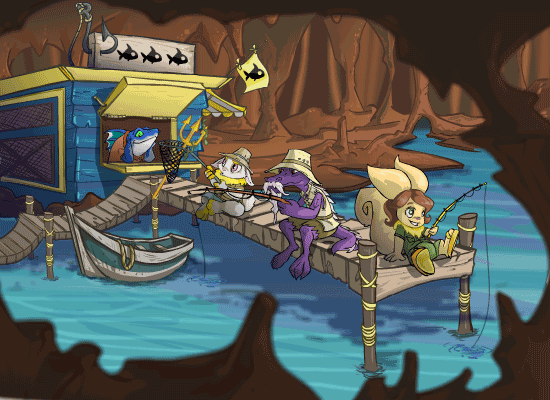
Ye Olde Fishing Vortex is the place to try your hand at Underwater Fishing. With your active pet, you can attempt to go fishing all day but the average wait time between successful catches is 12 to 14 hours. The items that your pet will fish up depend on their fishing level. Your pet’s fishing level will increase the more you fish with the pet. There is no specific time of day or items that will increase your chances of success.

Underwater Fishing

Underwater Fishing Link

The underwater fishing pool is located in Maraqua. Near the bottom right of the map, you’ll see the link to the Maraquan Ruins. From there, you can find Ye Old fishing Vortex in the upper left of the map. Or you can skip all of that and click the Ye Old Fishing Vortex link here.

Underwater Fishing Cheats

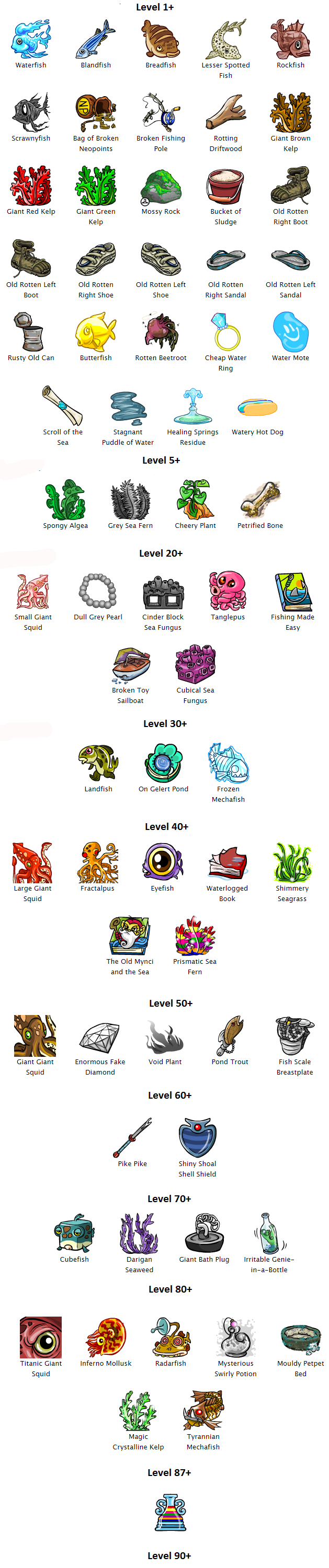
Currently, the maximum fishing level is 500. Fishing level is connected directly to your active pet and to your account. If a pet with a high fishing level is moved to a new account, its level will be reset to level one. However, if that pet is brought back to the account where it gained the initial levels, those levels will be restored. In short, Fishing level 250 Pet is moved from Account A to Account B and becomes Fishing Level 1 Pet; When Fishing Level 1 Pet moves back to Account A, it becomes Fishing Level 250 Pet again. You can view your pet’s lookup to see what their current fishing level is under the stat “Fishing Skill.” Each pet has their own fishing skill stat so you’ll need to switch up active pets if you want all your pets to have a high level. Gaining levels only happens if you successfully catch an item from the vortex. The list below shows the lowest recorded possible level to find each item. All of these items are unique to the fishing vortex.

Neopets Underwater Fishing

Special Neopets Fishing Items

Among its exclusive items, the vortex has special items that have unique properties when used. These items tend to be a rare catch but will fetch a good price if you’re lucky enough to fish one up.

The Mysterious Swirly Potion is a one-use item that will turn your pet into a random limited edition pet. The list of limited edition pets are Chomby, Cybunny, Grundo, Kiko, Koi, Jetsam, Lutari, Poogle, Tonu, Hissi and Ruki. The potion is especially useful because it will change your pet into an LE species while maintaining the current color of the pet, as long as the color is also available for the new species. If the color is not available for the new species, than the pet will turn a random basic color. For example, if you use a Mysterious Swirly Potion on your Ice Korbat, and the potion turns it into a Poogle, then the Poogle would not be Ice, since there is no Ice Poogle color available. The Poogle would be red, blue, green or yellow instead.

The Flask of Rainbow Fountain Water is similar to the Mysterious Swirly potion. However, this time when used on a pet, the pet will keep its current species and will instead turn a random color. The flask is also one-use. Unlike the fountain that it is named after, the Flask of Rainbow Water can turn your pet ANY color, with the only exception being the Ice color for Bori. That means that coveted colors such as Robot are available when using this item. You will also not receive the “Buzzin” avatar from this item, as it does not count as a dip into the Rainbow Fountain.

The Irritable Genie-in-a-Bottle is a one-use item that raise your pets stats. Your pet can gain between 1-3 levels from the Genie.

The Fishing Made Easy book will increase your pets intelligence like any other book but it will also increase your pet’s fishing skill instantly by 1-3 levels.

The Pant Devil Attractor is an inexpensive item, but it is highly usefully. When this item is in your inventory, it attracts the Pant Devil and he will most likely steal the attractor than any other item. So hording attractors in your inventory is especially useful when borrowing irreplaceable lending items like BGC, SuAP or MSPP.

Neopets Fishing Avatar

To obtain the avatar, your pet must fish up a Titanic Giant Squid. The squid is available around level 80+ so your pet will have to become a diligent fisher to gain the opportunity.However, do not be surprised if you find your pet is past level 80 and has not found a squid. Items fished from the vortex are random, so it might take awhile before you’re fortunate enough to find one.

Ye Olde Fishing Vortex
Last updated: 12/13/2024

Neopets User Lookups

Userlookups in Neopets are one of the most fun and personalized features the site has to offer. They are your own customizable profiles that showcase everything about your Neopets experience, from your favorite pets and their achievements to the trophies you’ve earned, your shop’s status, and even the guilds you’re part of. It’s like having a mini-webpage dedicated just to you, and best of all, you can make it uniquely yours. Whether you’re a seasoned player with tons of accomplishments or a newcomer still figuring things out, your userlookup is your personal Neopets identity, and there’s a lot of ways to make it shine!

In this section, we’ll dive deeper into the various elements that make up a user lookup, why they’re such a fun aspect of the Neopets community, and how you can easily personalize and edit yours.

What Exactly Is a Userlookup?

A userlookup is a special page tied to your Neopets account that contains all sorts of information about you. When someone visits your userlookup, they can see a summary of your Neopets activities, achievements, and even some of the personal things you’ve chosen to share, like your avatar collection, recent activities, and profile information.

The best part about a userlookup is that it’s fully customizable, meaning that you can design it to reflect your personality, interests, or favorite parts of the Neopets world. Many players use it as a canvas to express their creativity, showcasing their pets in action, displaying their trophy collection, or even highlighting their Neopets shopping business.

Neopets User Lookup

FILLING OUT THE INFORMATION on the USER LOOKUP

When you go to change information on your lookup, there are a couple of things you can fill out. Some are required, where others are not.

  • Username: This is your username, it cannot be changed.
  • Current Password: Your current password is required to make any changes to your personal information.
  • New Password: Changing your password. Put in a new password here.
  • Confirm Password: Re-type in this box if you’re changing your password. Just to make sure the spelling is correct in both.
  • Full Name: It is not required. You can put anyname you like.
  • Interests: What do you like to do?
  • Date of Birth: Again, not required, but you should use it because you can get a Neopets sidebar on your birthday.
  • Gender: Male or female?
  • Country: What country do you live in?
  • US State: For US users only.
  • Zip/Postal Code: Not required.
  • About Me: Here you can enter a few lines about yourself so that other people can see what your favourite bands are, what you like doing at school, etc. Please remember that all your REAL stats must be visible. Hiding or covering them (and retyping the info yourself) is not allowed.

VIEWING YOUR USERLOOKUP

Name : Your name.
Last Spotted : Last time you logged in.
Status : Online or offline?
Gender : Male or female?
Country : What do you live?
Started Playing : The date you signed up to NeoPets.
Hobbies : What you like to do.
Shop : Your shop – place to sell items.
Gallery: Your gallery – place to put items.
NeoDeck : Your neocards.
NeoHome : Your neohome address
+ Rooms : Number of rooms you have.
+ Carpet : Type of flooring you have.
+ Lighting : Type of light you have.
+ Central Heating : Type of heating you have.
+ Wallpaper : Type of insurance wallpaper you have.
+ Insurance : Type of insurance you have.
Guild Info : The guild you are in.
Secret Avatars : How many avatars do you have?

trades-2886504
Trades
auctions-3702002
Auctions
scores-5510477
Scores (#)
stamps-8121589
Stamps (#)
wishlist-2482954
Wishlist
kau_tyrannian_happy-5387908
Your Pet
109_3-7916602
Your Trophies
9mth-7627128
Shields

USER LOOKUPS F.A.Q.

How do I block people from neomailing me or requesting to be my Neofriend?
Go here.

How do I block people from neomailing me or requesting to be my Neofriend?
Go here.

How do I change my shield?
You can’t. It will change automatically according to the amount of time you’ve been playing NeoPets for.

How do I create a fancy lookup?
That would take awhile for me to explain how, most people learn through tutorials. But if you want one, our site offers a bunch of free ones already coded and everything, just click here to get them.

Can you explain what Neohomes, shops, galleries, secret avatars, guilds, etc. are?
Yes. If you go to the left hand side under “NeoPets Guides”, we have a guide for each of those.

How can I change my “Status” category on my lookup?
Click here.

Last updated: 03/06/2026

Neopets Spotlights

Do you dream of seeing your name in lights? Want to make your mark in the Neopian world? Neopets Spotlights are your chance to gain recognition through creativity and originality! With a little effort and this guide, you’ll be well on your way to becoming a celebrated Neopian.

Neopets Spotlights Neopets Spotlight Spotlight Neopets Spotlight Neopet Neopets Spotlight

What Each Neopets Spotlight Is

Before diving into the world of spotlights, it’s essential to understand what each category entails. Here’s a quick rundown:

  • Art Gallery: Showcase your artistic talent! Submit a stunning piece of art for a chance to win a trophy.
  • Gallery Spotlight: Curate a collection of items centered around a specific theme or genre. The more unique, the better!
  • Pet Spotlight: Think your pet stands out? Create a descriptive entry and design a unique image to showcase your furry friend.
  • Petpet Spotlight: Similar to the pet spotlight, but this time, it’s all about your adorable petpets!
  • Neoadventure Spotlight: Do you have the most thrilling neoadventure? Share your story and you could be recognized for it!
  • Neohome Spotlight: Show off your stylish Neohome designs. Let your interior decorating skills shine!
  • Poems Spotlight: If poetry is your passion, submit your best work for a chance to be spotlighted.
  • Site Spotlight: This category is for your petpage. Create an engaging and informative page about your Neopet or a topic of interest.
  • The Neopian Times: Write an article, story, or even illustrate a comic. The Neopian Times is a platform for all kinds of creative writing.
  • User Lookup Spotlight: Have an impressive user lookup? Share it with the world and show off your skills!

Getting Entered: Steps to Win a Neopet Spotlight

Entering a spotlight requires creativity, effort, and attention to detail. Here’s what you need to know to increase your chances of winning:

  1. Originality is Key: Ensure that everything you submit is 100% your own work. Original ideas will catch the judges’ attention.
  2. Put in the Time: Quality takes time. Don’t rush your submission; instead, spend ample time perfecting it.
  3. Proper Grammar and Spelling: Use correct grammar and spelling in your entries. Sloppy submissions can hurt your chances.
  4. Think Outside the Box: Creativity is vital. For example, if you’re submitting for the Gallery Spotlight, consider unique themes that go beyond the obvious.
  5. Add Humor: Many spotlights, especially site spotlights, benefit from a touch of humor. A clever or funny presentation can make your entry memorable.
  6. Visual Appeal: While your submission should look good, ensure it remains easy to read. Avoid overly bright or distracting fonts and colors.

F.A.Q: Frequently Asked Questions about the Neopets Spotlight

I was rejected! Why is that?
Rejection doesn’t always mean your entry was lacking. It could be due to the high volume of entries or the similarity to another submission.

Can I enter again?
Absolutely! Persistence is vital. Keep refining your ideas and submitting until you achieve your spotlight dream.

How do I enter into spotlights?
Head to the Pet Central section of Neopets. Scroll down to find a list of spotlights. Each category has detailed instructions on how to submit your entry, either through a form or via email.

Conclusion

Winning a Neopets Spotlight is an exciting opportunity to showcase your creativity and hard work. With this guide, you’re equipped with the knowledge to navigate the spotlight system effectively. Remember to be original, put in the effort, and most importantly, have fun! Good luck on your journey to Neopian fame!

Last updated: 12/18/2024

Neopets Your Shop

In the vibrant world of Neopia, every Neopian dreams of running a successful shop where they can showcase their unique products and make a profit. The Marketplace is your gateway to this entrepreneurial adventure, allowing you to open a shop and sell items to other players. Whether you’re a seasoned trader or a newcomer eager to explore the possibilities, this guide will equip you with everything you need to know about managing your very own shop.

1242-9350894

Creating Your Shop

To embark on your shopping venture, you need to create your shop. Here’s how to get started:

  1. Accessing the Shop Creation Tool: Navigate to the Marketplace and look for the option labeled “Create/Edit a Shop.” This is your launching pad into the world of Neopian commerce.
  2. Initial Cost: Setting up your shop will cost you 250 Neopoints (NP). This fee ensures your shop is registered and ready for business.
  3. Shop Name and Description: Choose a catchy name that reflects your shop’s theme. Additionally, you can include a description that entices potential buyers and informs them about what you sell.

Managing Your Shop

Once your shop is created, you’ll want to manage it efficiently to maximize your profits. Here are the key features and options you’ll encounter:

1410-7628285

1. Stocking Your Shop

  • View Your Stock: The “Stock” section allows you to see all the items currently available in your shop. You can adjust prices or remove items that are not selling well.
  • Item Price Restrictions: Be aware that items priced at 0 NP will not be displayed in your shop. Similarly, items costing 100,000 NP or more cannot be sold.
  • Removing Items: If you decide to remove an item from your shop, it will be returned to your inventory. Simply select the item and click “Rm” to take it out of stock.

2. Shop Till

When you sell items, the proceeds will go directly into your Shop Till. This is where you’ll see the profits from your sales accumulate, ready for you to withdraw or reinvest.

3. Sales History

Keep track of your shop’s performance with the Sales History feature. This will display a record of who bought items from your shop, but only for purchases of 1,000 NP or greater. This information can help you understand which items are popular and worth restocking.

4. Quick Stock

For convenience, the Quick Stock feature allows you to easily deposit items into your shop or other locations like the Money Tree. This is a great time-saver, especially when you have a lot of items to manage.

5. Shop Front

Your Shop Front is the face of your business. Here, potential customers will browse your inventory. Ensure that it looks appealing, as first impressions can lead to sales!

6. Shop Blogs

Add a personal touch with a cute shop blog. You can create one and insert the code into the “Create/Edit A Shop” section under “descriptions.” This can enhance your shop’s charm and engage customers further.

7. Item Gallery

While your shop is a place for selling, don’t forget about your Item Gallery. This is where you can showcase items that are for collection rather than sale. It’s a perfect way to display your rare finds and favorites.

Upgrading Your Shop

As your business grows, you may want to expand your shop’s capabilities:

1243-1876765

  • Upgrading Size: To increase your shop size, visit “Create/Edit a Shop” and scroll down to find the upgrade option. The cost to upgrade is 200 NP times your current shop size.
  • Benefits of Upgrading: A larger shop allows you to stock more items, increasing your potential sales.

Pricing Your Items

Determining the right price for your items is crucial for sales:

  • Research Prices: Use the Shop Wizard to look up your items and see how much others are selling them for. A good strategy is to price your items slightly below the lowest price listed to attract buyers.
  • Dynamic Pricing: Keep an eye on market trends. If an item is in high demand, consider adjusting your prices accordingly.

Frequently Asked Questions (F.A.Q.)

Here are some common questions Neopians have about managing their shops:

  1. How much does it cost to start a shop?
    • It costs 250 NP to create your shop.
  2. How do I upgrade my shop size?
    • Go to “Create/Edit a Shop” and scroll down to find the upgrade button. The cost is 200 NP times your current shop size.
  3. How do I change my shop description?
    • Navigate to “Create/Edit a Shop” and edit the “Shop Description” section.
  4. How much should I sell my items for?
    • Lookup the item on the Shop Wizard and sell it for a little less than the lowest price.
  5. How do I place items into my shop?
    • Access your inventory, click on the item you want to sell, and select “Put in Shop” from the dropdown menu. You can remove items at any time.
  6. What happens if I don’t sell items?
    • Unsold items can be kept in your inventory indefinitely or removed from your shop.
  7. Can I sell items that cost 0 NP?
    • No, items priced at 0 NP will not be displayed in your shop.
  8. Are there any limits on how many items I can sell?
    • Yes, the number of items you can sell is limited by your shop size.
  9. How do I see who bought my items?
    • You can check your Sales History for a record of purchases over 1,000 NP.
  10. Can I sell items for more than 100,000 NP?
    • No, items costing 100,000 NP or more cannot be sold in your shop.
  11. What if my shop isn’t selling well?
    • Re-evaluate your pricing and stock popular items to attract more customers.
  12. How often should I restock my shop?
    • Regularly restock based on demand and trends; frequent updates can keep your shop fresh.
  13. Can I change the layout of my shop?
    • While you cannot change the physical layout, you can adjust your stock and descriptions to enhance appeal.
  14. What are the benefits of having a shop blog?
    • A shop blog can engage customers, create a community, and provide updates about new stock or promotions.
  15. How can I promote my shop?
    • Use the Neopian forums and social media to advertise your shop. Engaging content can draw visitors.

Conclusion

Managing your own shop in Neopia can be an exciting and rewarding experience. From stocking items to setting prices and engaging with customers, each aspect of your shop contributes to your overall success. With the right strategies and dedication, your shop can become a staple in the Neopian Marketplace, attracting customers and generating Neopoints. Whether you’re selling rare items, everyday goods, or personal creations, remember that a well-managed shop can lead to both profit and enjoyment in your Neopian adventures.

Last updated: 12/13/2024