Neopets Site Theme Hack

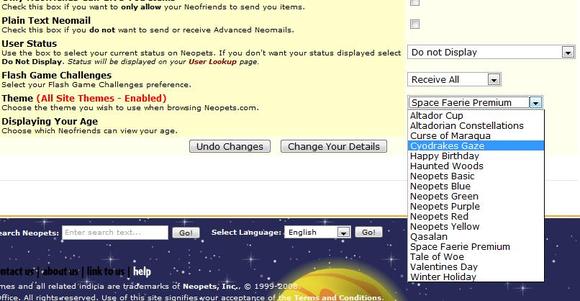
This script will allow you to use ANY site theme on neopets.com, even if you haven’t unlocked it yet. You will not physically receive the site theme, but you will be able to use any site theme as if you had it.

Neopets

Neopets Site Themes

Last updated: 12/13/2024

Neopets Game Hacks

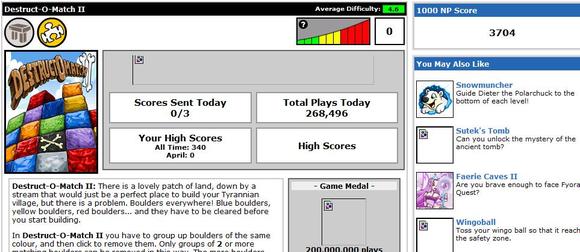
This script will do various things. Everything from default seting the Grump Old King to the avatar question, and a random answer. Chooses a random Wise Old King words of wisdom. Chooses random numbers for neopian lottery. Shows you the score needed to get 1000NP for every game, and much more!
Neopets

Neopets Hacks

Last updated: 12/13/2024

Neopets Petpages

In the vibrant world of Neopia, every pet has a unique homepage known as a Petpage. This feature allows you to showcase your creativity, share information about your pet, and connect with friends. Whether you want to display your pet’s achievements or just add a personal touch, Petpages are an essential aspect of the Neopets experience.

Petpages neopets

Basics of Petpages

Petpages serve as a personalized homepage for each of your pets. Here’s what you can do with them:

  • Edit Your Petpage: Customize your pet’s page to reflect their personality and achievements.
  • View Your Petpage: Check how your pet’s page looks to others by clicking the view button.
  • Visitor Tracking: See how many visitors have checked out your pet’s page.
  • Site Spotlight Trophy: If you put considerable effort into your Petpage, you might even win a trophy in the Site Spotlight!

How to Access Petpages

To get started with your Petpage:

  1. Go to Pet Central in Neopia.
  2. Click on Petpages to access the editing and viewing options.

Editing Your Page

When you edit your Petpage, you’ll enter an HTML editor where you can modify the content. Here are some important rules and tips to keep in mind:

General Rules for Editing

  • Neopets Header: Your Petpage will always include a Neopets header.
  • Spirit of Neopets: Keep the content friendly and in line with Neopian values—avoid any obscene or offensive images and text.

HTML Tags You Can Use

During editing, you can utilize specific tags to enhance your Petpage. Here are some useful ones:

  • #PHOTO: Link to an image for a photo of your pet.
  • #NAME: Display your pet’s name.
  • #OWNER: Show your username.
  • #OWNERLOOKUP: Link to your user profile.
  • #HOURS: Display how many hours old your pet is.
  • #LEVEL: Show your pet’s level.
  • #VISITOR: Display the name of the visitor logged into Neopets.
  • #STRENGTH, #MOVE, #DEFENCE, #MAX_HP, #CURRENT_HP, #INTELLIGENCE: Show various stats for your pet.
  • #BD_PLAYED, #BD_WON, #BD_LOST, #BD_DRAWN, #BD_SCORE: Display Battledome statistics for your pet.

Important Editing Tips

  • Large Text Box: This is where you can put the content for your Petpage. Feel free to get creative!
  • HTML Guide: If you’re new to editing web pages, check out the Neopets HTML guide to help you learn how to make an attractive Petpage.
  • Reset Page: Be cautious with the Reset Page to Default button; using it will erase all your changes and revert to the basic template. Only use this if you want to start fresh!

Finding Inspiration and Resources

If you’re unsure where to start, there are many resources available:

  • Neopets Help Sites: Many Neopets help sites offer pre-made layouts and templates that you can use or draw inspiration from.
  • Website Layouts Page: This page often features various graphics and layouts contributed by other users.

Conclusion

Creating and managing your Neopets Petpage is a fantastic way to express yourself and showcase your pets’ personalities and achievements. By utilizing the editing tools and following the guidelines, you can create a unique and engaging homepage that stands out in Neopia. So, get started today and let your imagination run wild as you craft the perfect Petpage for your beloved Neopet!

Last updated: 12/14/2024

Neopets Punchbag Bob

Punchbag Bob is the easiest challenger ever because he never fights back. The problem? He takes about an hour to beat depending on your pet. Punchbag Bob is a default challenger so you don’t have to go anywhere special. Just head over to the One Player Battles and challenge him. Make sure you select your strongest pet! If you have enough patience to beat him, you will recieve a trophy for your lookup.
Punchbag Bob
The Trophy!

BEATING PUNCHBAG BOB – TIPS

Beating punchbag isn’t easy for those who don’t know what they’re doing. No matter how strong your pet or weapons are, you can beat him… eventually.

  • DO NOT go into the battledome with a one time use item. Why? Because since it is one time use, you’ll probably just take off about 20 hit points and have to quit.
  • Take STRONG and GOOD multiple use items. DO NOT take snowballs in with you.
  • Don’t take Elixir into the battle with you. Why? Because he doesn’t fight back therefore you will have no need for them.
  • This may take awhile. Try focusing on just the battle and getting it over with. Yes, that means no MSN conversations. The horror of that!
  • If you ANY abilites, turn them on. If you don’t, get some!

BEATING PUNCHBAG BOB – SUGGESTED ITEMS

Since you’re about to sit in front of the computer battling away, you should go prepared. I’ve found some cheap items for people to use that will do some good damage.

bd_axe_02-6997663
Item: Rubber Power Axe
Price: 650 NP
bd_attackfork-5976214
Item: Attack Fork
Price: 2 000 NP
bd_desert_knife2-5247032
Item: Lost Desert Dagger
Price: 15 000 NP
bd_cobradagger-2509720
Item: Cobrall Dagger
Price: 1 000 NP

BEATING PUNCHBAG BOB – YOU’RE DONE!

As soon as you beat punchbag bob, you will automatically recieve your trophy – no waiting! The average time for beating punchbag bob is 25 minutes to an hour, so if you completed this task before that time, good job!

neopets Punchbag Bob
Last updated: 12/13/2024

Neopets Shop Wizard

In the vibrant world of Neopia, the Neopets Shop Wizard is an essential tool for players looking to navigate the bustling marketplace efficiently. Whether you’re hunting for rare items, trying to score a bargain, or simply exploring the vast array of shops, the Shop Wizard enhances your shopping experience. This guide will delve into how to use the Shop Wizard effectively, its features, and tips to maximize your shopping adventures in Neopia.

shopwizard-1703023


What is the Neopets Shop Wizard?

The Neopets Shop Wizard is a helpful feature that allows players to search for items across various shops in Neopia. By utilizing this tool, you can easily find out where specific items are sold, compare prices, and even check for the availability of items across different stores. It acts as your personal shopping assistant, making your Neopian adventures much more streamlined.


Accessing the Shop Wizard

Getting started with the Shop Wizard is simple. Here’s how to access it:

  1. Navigate to the Wizard: The Shop Wizard can be found on the Neopets homepage or in the Shops section of the Neopian directory. Click on the Shop Wizard link to open the tool.
  2. Search for Items: Once in the Shop Wizard interface, you can enter the name of the item you’re looking for in the search bar. This will initiate a search across all participating shops.

Features of the Shop Wizard

The Shop Wizard offers several features that enhance your shopping experience. Here’s what you can expect:

  1. Item Search: Simply type in the name of the item you’re looking for. The Shop Wizard will return a list of shops that sell that item, along with their prices.
  2. Price Comparison: The Shop Wizard displays prices from various shops, allowing you to find the best deals. This is particularly useful for rare or sought-after items that may vary in price across shops.
  3. Availability Alerts: If an item is out of stock in the shops, the Shop Wizard will inform you, saving you the hassle of checking each shop manually.
  4. Shop Ratings: Some players also provide ratings and reviews for shops, giving you insight into where to find quality items and trustworthy service.

How to Use the Shop Wizard Effectively

To get the most out of the Shop Wizard, consider these strategies:

  1. Be Specific in Your Searches: The more specific you are with the item name, the more accurate the search results will be. If you’re looking for a specific item, make sure to type the full name.
  2. Check Multiple Listings: Prices can vary significantly from one shop to another. Always compare listings to ensure you’re getting the best deal.
  3. Keep an Eye on Stock Levels: If you notice an item is out of stock in most shops, it may be worth waiting for it to come back. Items can fluctuate in availability, so patience might pay off.
  4. Use Filters: Depending on the current features of the Shop Wizard, utilize any filtering options available to narrow down your search results, such as shop type or item category.

Tips for Successful Shopping with the Shop Wizard

To optimize your shopping experience, keep these tips in mind:

  1. Frequent Updates: Prices and availability can change frequently in Neopia. Check back often to stay updated on the best deals and items.
  2. Participate in Events: Neopian events often feature limited-time items that can be found through the Shop Wizard. Be sure to participate in these events to access exclusive merchandise.
  3. Explore New Shops: Don’t limit yourself to popular shops. The Shop Wizard can help you discover hidden gems in Neopia that offer unique items at competitive prices.
  4. Stock Up on Neopoints: Before diving into a shopping spree, ensure you have enough Neopoints saved up. This will allow you to take advantage of great deals when they arise.

FAQ About the Neopets Shop Wizard

1. What is the Neopets Shop Wizard?

The Shop Wizard is a tool that allows players to search for items across various shops in Neopia, helping them find the best prices and availability.

2. How do I access the Shop Wizard?

You can find the Shop Wizard link on the Neopets homepage or within the Shops section of the Neopian directory.

3. What types of items can I search for?

You can search for virtually any item available in Neopian shops, including food, clothing, weapons, and collectibles.

4. Does the Shop Wizard show prices?

Yes, the Shop Wizard provides a list of shops selling the searched item along with their prices for easy comparison.

5. Can I find out if an item is out of stock?

Yes, the Shop Wizard will indicate if an item is currently out of stock in the shops.

6. Are there any tips for better searching?

Be specific with item names and utilize filters to narrow down search results for more accurate findings.

7. Can I compare prices from different shops?

Absolutely! The Shop Wizard displays prices from various shops, allowing you to find the best deals.

8. How often is the Shop Wizard updated?

The Shop Wizard is updated regularly to reflect changes in item availability and pricing across shops.

9. Is there a limit to how many items I can search for?

No, you can search for as many items as you like, one at a time.

10. Can I find rare items using the Shop Wizard?

Yes, the Shop Wizard is an excellent resource for locating rare items that may be available in specific shops.

11. Is there a way to report issues with the Shop Wizard?

If you encounter any problems, you can contact Neopets support for assistance.

12. Can I shop without a Neopet?

You do not need to own a Neopet to use the Shop Wizard; it is accessible to all players.

13. What should I do if I can’t find an item?

Try searching with different keywords or check the item’s rarity level. Some items may only be available during special events.

14. Are there other shopping tools in Neopia?

While the Shop Wizard is the primary tool, you can also explore shops manually or use other Neopian resources to find items.

15. Can I receive notifications for certain items?

Currently, the Shop Wizard does not offer notifications, so you’ll need to check back regularly for updates.

16. Is there a mobile version of the Shop Wizard?

Yes, you can access the Shop Wizard through the Neopets mobile app or site.

17. How do I know if a shop is reputable?

Some shops may have player ratings or reviews available through the Shop Wizard to help you gauge their reputation.

18. Can I trade items found through the Shop Wizard?

Items purchased through shops can be traded with other players.

19. What should I do if I want to sell items?

To sell items, you’ll need to visit the Shop Wizard’s selling feature or set up your own shop to list items for sale.

20. Does the Shop Wizard help with seasonal items?

Yes, you can use the Shop Wizard to search for seasonal or event-specific items during those times.

21. Are there any special discounts available through the Shop Wizard?

Occasionally, shops may offer discounts or sales, but these are not typically advertised through the Shop Wizard.

22. Can I search for multiple items at once?

The Shop Wizard allows you to search for one item at a time, but you can repeat the search for additional items.

23. What if the prices seem too high?

Prices can vary widely, so check different shops. You might find better deals elsewhere.

24. How do I find out about upcoming items?

Keep an eye on Neopian news for announcements about new items and seasonal events.

25. Is the Shop Wizard available in all languages?

The Shop Wizard is primarily in English, but Neopets may offer support in multiple languages.


Conclusion

The Neopets Shop Wizard is an invaluable tool for any player looking to enhance their shopping experience in Neopia. By providing easy access to a wide array of items, price comparisons, and availability checks, it simplifies the often overwhelming marketplace. Embrace the power of the Shop Wizard and elevate your Neopian adventures today!

Last updated: 12/13/2024