Neopets Secret Ninja Training School Guide

If you (and your neo-wallet) work very hard at training your pet, there will come a time when it graduates from both the Swashbuckling Academy and the Mystery Island Training School. Once this is the case, you’ll need to take up training at the Secret Ninja Academy, also found on Mystery Island. This is only for elite BD pets, so you won’t be able to access it otherwise!

FINDING THE SECRET NINJA SCHOOL

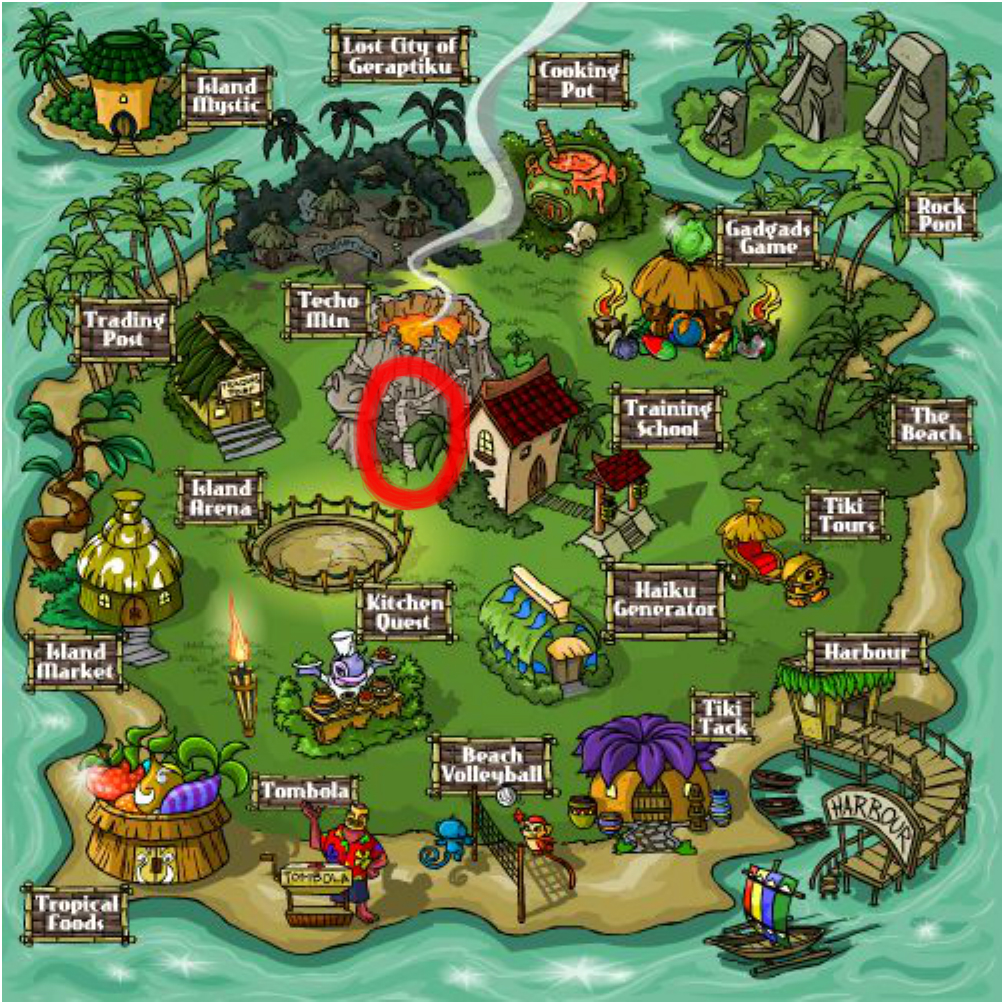
It’s not called “secret” for nothing! The Secret Ninja Training School is located on Mystery Island, up the stairs of the volcano next to the regular Training School. You can find it based on the picture below (or just click the direct link above):

Neopets Secret Ninja Training School Guide

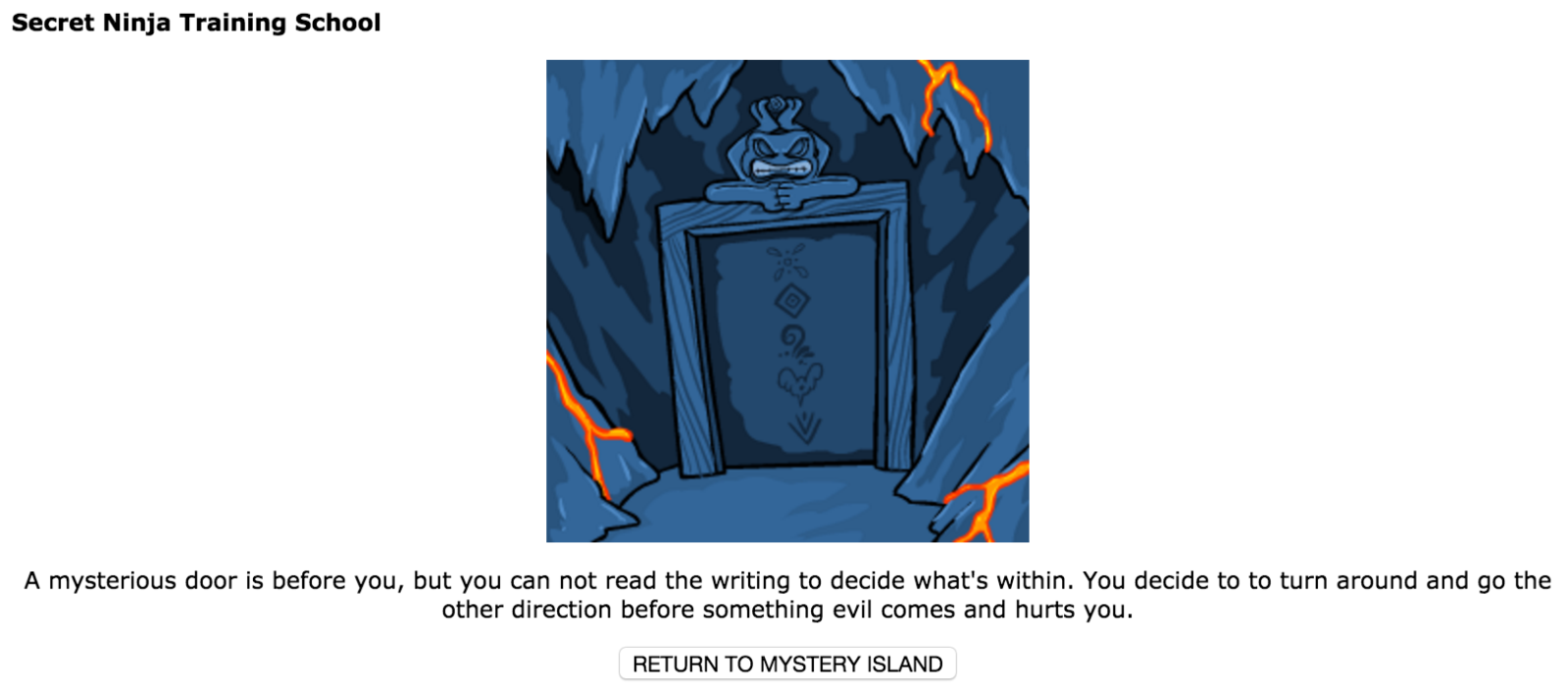
If you don’t have a pet that is eligible to train here — i.e. a pet that is at least level 250 — then  you will get the following message:

Secret Ninja Training School

Don’t have your feelings hurt! Just train harder.

TRAINING AT THE NINJA TRAINING SCHOOL

Training here is exactly like Mystery Island Training School. You simply enroll your pet in a specific course and then pay the codestone(s) required to complete that course. Unlike the MITS, you can cancel the course you selected in order to choose a new course; the only catch is that you have to wait a full 24 hours before you’ll be able to select a new course at all.

Course Type Your Pet’s Level Cost (in Red Codestones) Length of Course
Intermediate 250 1 codestone 4 hours
Adept 300 2 codestones 6 hours
Advanced 400 3 codestones 8 hours
Expert 500 4 codestones 10 hours
Master 600 5 codestones 12 hours
Grand Master 750+ 6 codestones 12 hours

You can train all of your stats here: Strength, Defense, Health (Endurance), Movement (Agility), and Level. Just as with the Swashbuckling Academy and MITS, you cannot train your pet’s stats above twice its level, so always keep your pet’s level in mind!

Cutting down on training time

If 12 hours is simply too much for you to wait, you can head over to Noda’s Fortune Cookies (NC Mall) and purchase a Training Fortune Cookie. They currently cost 125 NC and reduce your training time between 30% and 75% for five days.

Ninja Training School

PAYING FOR YOUR COURSES: RED CODESTONES

While the Swashbuckling Academy takes dubloons and the Mystery Island Training School takes tan codestones, you must pay for your courses at the Secret Ninja Training School with red codestones. These are generally more expensive than tan codestones, though you are able to use less codestones for a much longer amount of time (see the table above).

Cui Codestone Kew Codestone Mag Codestone Sho Codestone Vux Codestone Zed Codestone

WHERE DO YOU GET THESE THINGS?

There are a couple of ways to get red codestones:

  • Make your own! You can throw one of every tan codestone into the Mystery Island volcano and you will receive one random red codestone in return.
  • Purchase from regular Shop Wizard or Super Shop Wizard (SSW). Prices fluctuate occasionally but they are otherwise what you’ll generally see them at on SSW. Because so many players now have SSW, particularly “elite” restockers and resellers, SSW tends to dictate the prices of items more correctly than regular Shop Wiz.
  • Win them in the Battledome. Red codestones can be given out as a prize in the BD. This happens mostly commonly with Jetsam Ace in the Premium-only Cosmic Dome. For non-Premium members, they are given out as a general prize in any dome, but it is quite a rare occurrence. (They say that Koi Warrior has the highest chance of giving them out, though!)
  • Try your luck at the Money Tree. Hey, you never know!

SHOP

You may notice there’s a small shop in the Secret Ninja Training School. Here, you can buy some relatively cheap goods, listed here.

NOTES

  • You are free to train any eligible pets on your side accounts. Make sure that the codestones or NP to buy codestones for these side account pets are from your main account!
  • Just like with the Swashbuckling Academy and Mystery Island Training School, you can receive super bonuses at the Ninja School. Here, though, you will always receive at least two extra bonus points instead of one!
Last updated: 12/14/2024

Neopets Loyal Users Guide

If you’ve been a Neopets user for over four months—or even longer—you may be eligible for some special perks that recognize your dedication and loyalty to the site. Since 2008, Neopets has been offering exclusive bonuses to players with older accounts, rewarding them for their continued participation and commitment to the community. The longer you’ve been on Neopets, the more impressive these perks can become!

These accounts are considered “experienced” or “loyal,” marking them as seasoned veterans of the Neopets world. Whether your account is a few months old or a decade-plus in the making, these special benefits are a fun way to show appreciation for long-time users. As your account ages, you’ll unlock new opportunities and rewards that newer accounts won’t have access to.

The exact perks vary depending on how long you’ve been a member, and they can include anything from special in-game rewards to unique features and abilities that enhance your overall gameplay experience. Curious about what your account is eligible for? Keep reading to find out exactly what you can do with your seasoned Neopets profile and how to make the most of these exclusive bonuses!
Neopets Loyal Users

HOW OLD IS YOUR ACCOUNT?

To find out your account age, simply go to your userlookup by clicking your username at the top-right corner of the screen. Once you get to your UL, check the section called “User Info.” You should see this:

The shield will tell you how old Neopets recognizes your account to be, and it also tells you your exact account age under “Started Playing.”

You can also post on the NeoBoards to know the exact age in months of your account! Simply make a post and then look at the left-hand column under your username:Now you don’t have to do the math yourself!

Now that you know how old your account is, let’s see what you can do with it!

NEOPETS OLD ACCOUNT PERKS

There are A LOT of perks, but not all will apply to accounts simply over 4 months old. These accounts, considered “newbie” accounts, are restricted from participating in the site in certain ways, such as being able to adopt Limited Edition pets. This list, though, is about what is extra for users whose accounts are old!

Increasing User-to-User Transfers

The older your account, the more secure transfers you can use every month! This perk, released in spring 2010, grants an extra user-to-user transfer for every two years aged on an account. If you want to know how many transfers you are currently eligible for, refer below:

Account Age Number of Secure Transfers
0 – 4 months 0
4 – 23 months 1
24 – 47 months 2
48 – 71 months 3
72 – 95 months 4
96 – 119 months 5
120 – 143 months 6
144 – 167 months 7
168+ months 8

Almost Abandoned Attic

For accounts 3 years and older, there is a mysterious house in a deep, dark part of the Haunted Woods called the Almost Abandoned Attic. Like the igloo, this “shop” stocks random items at a somewhat unpredictable time, but the items that stock here are r80-r99. That’s right! You can get all sorts of items ranging from fancy stamps to Draik eggs!

neopets old account perksI know you want this. Don’t even deny it.

Much like feeding Kads, there is a estimated time the Attic will restock: :53 of one minute to :20 of the next minute. This happens about every seven minutes. For more details on how to follow the times, read this Attic Timer.

Extra Space in your NeoMail inbox

Upon creating an account, each user is given an inbox that hold up to 100 messages. Well, as your account ages, you can now hold more messages than ever!

header_neomail-4729733

Account Age Neomail Inbox Space – Up to…
0 – 35 months 100 messages
16 – 38 months 110 messages
39 – 41 months 120 messages
42 – 44 months 130 messages
45 – 47 months 140 messages
48 – 50 months 150 messages
51 – 53 months 160 messages
54 – 56 months 170 messages
57 – 59 months 180 messages
60 – 62 months 190 messages
63+ months 200 messages

If you hit your limit, other users won’t be able to neomail you. Make sure to keep it tidy!

Discount at the Hidden Tower

In Fyora’s Hidden Tower of awesome goods, users with accounts 60 months and older can enjoy a 3% discount on the third day of every month! This is a hefty amount of NP when you’re talking about expensive items like the Royal Paint Brush.
NEOPETS OLD ACCOUNT PERKS

NOTE: You cannot stack the 10% discount you may receive from a Random Event with the 3% discount.

NC Mall Elite Boutique

In April 2008, the “Elite Boutique” was released in the NC Mall for accounts 49 months and older. You can access the boutique by going to the NC Mall and then clicking this icon in the top-right corner:

experienceduser_icon-3865279

The items sold in the boutique are only available in the boutique, meaning accounts under 49 months won’t have the option to buy them.
NOTE: These items also be gifted or traded through gift boxes like other NC items.They are exclusive to your account once purchased.

Keep a book

For accounts 24 months and older, there’s a chance that a book will not disappear after it has been read to your pet! Generally after a pet reads a book, it will vanish:

But for these older accounts, books will very occasionally remain in your inventory even after your pet has read them! In these instances, this message won’t appear — your pet will simply tell you how much they enjoyed the book and then you can refresh your inventory to see the book remains. Then, you can decide whether to sell it, read it to another pet, or do something else with it!

Favourite Games List

To help organize your favorite games on Neopets, users are able to “favorite” them by clicking on heart icon at the top-left corner of a game.

As you can see, I haven’t clicked the heart on this one… *shakes fist*

Depending on your account age, you can “favorite” more and more games!

Account Age Number of Games You Can Favorite
0 – 18 months 12
19 – 44 months 15
45 – 68 months 18
69 – 93 months 21
94 – 110 months 24
111 – 136 months 27
137+ months 30

Extra NeoBoard titles

There are lots of customizable options in the NeoBoard preferences including your avatar and signature. For those who don’t know — or simply didn’t notice! — there is also something called a NeoBoard “title” that floats above your account age when you post on the boards:

I think this emoticon is nice and neutral.

Once your account has aged, there are far more options! For accounts 2 years and older, new options begin appearing over time. While we are not sure exactly which ones appear at exactly which time, it’s a nice surprise to check and see which new ones have appeared every couple of months!

Extra trading lots

All users are allowed to have up to 10 trading lots active at one time. As of 8 July 2010, though, users with accounts 36 months and older are able to have 15 trading lots! Trade away!

Extra “interests” for your userlookup

On your userlookup, you’re able to list what sorts of things interest you from literature to video games to your 8 pet cats (or is that just me?). For accounts 2 years and older, the list of choosable interests on your account expands to include tens more options!

Protection for UC pets

There are some Random Events that affect your active pet. If you’re walking around with a UC as your active, you want to protect them at all costs! Who knows how long it took you trade up to that pet or how many of your birthdays passed where you continued to innocently remind your friends that you only wanted one thing. angel-7503323 Anywayssss…

For accounts that are eligible to adopt painted pets, UC pets are not immune to Random Events that can change their color. While Boochi’s zaps always miss now, there are other REs such as your pet turning blue from sadness. Now, fear not! Your UC is safe.
NEOPETS LOYAL USER PERKSYou’re safe, precious UC.

SIDE ACCOUNTS AND LOYAL USER PERKS

It’s important to be very careful about what you take advantage of on your side accounts. Yes, some things can be accessed on side accounts, but a lot of things cannot! For a full list of side account dos-and-don’ts, go here. If you’re not sure about something, don’t risk it! For now, keep the specific perks we went over in this guide in mind:

  • Transferring pets is okay! Using the transfers on your side accounts to trade between your own accounts or with other users is fine.
  • Shopping in the Almost Abandoned Attic is allowed so long as you are using NP that have been sent to your side from your main. Remember that you can never make NP on your side accounts unless your main account is frozen.
  • You are free to use the extra space in your side accounts‘ inboxes! Message away!
  • It is okay to shop at the Hidden Tower in your side accounts so long as you are using NP that have been sent to your side from your main. Remember that you can never make NP on your side accounts unless your main account is frozen.
  • You can shop at the Elite Boutique on a side account, and anywhere in the NC Mall.
  • If your pet on your side account reads a book and it does not disappear, you can keep the book. You may read it to another pet, donate it, or send it back to your main account. You cannot sell it on your side account.
  • You can favorite games on your side accounts but you cannot play games on your side accounts. You can not make money in any way on your side accounts! Seems sort of useless to favorite them if you can’t play them, but I’m not gonna stop you!
  • You can certainly change your Neoboard title on your side accounts. You can use these to chat, too!
  • You can make trade lots on your side accounts but you cannot trade items to anyone but yourself. Only use trade lots on your sides to send items and/or NP from one account to the other!
  • It is certainly allowed for you to change your userlookup “interests” on your sides.
  • UC pets on your side accounts will also be protected — this goes for any account.

NOTES

  • If you’re ever banned from stocking in the Hidden Tower or the Attic, don’t move to a side account to continue. That’s against the rules!
Last updated: 12/14/2024

Neopets Lutari Talisman Guide

Sometime after the launch of Neopets Mobile and the ability to visit Lutari Island, Neopets released a Site Feature Trophy called the Lutari Talisman. Users could then collect beads to add to their talismans, supposedly granting some special perks throughout the site. With the decline of Neopets Mobile, the inaccessibility to Lutari Island, and the rarity of the beads, contributing to individual talismans has steeply declined in popularity.

Neopets Lutari Talisman

WHAT IS THE LUTARI TALISMAN?

The Lutari Talisman is likely very loosely based on a dreamcatcher, based in some traditional Native American cultures. Like certain dreamcatchers, they are decorated with beads.

Every account created or active today receives a talisman. You can locate your talisman by going to your userlookup and looking under Site Feature Trophies. It looks like this before you click on it:

Lutari Talisman

Clicking on it will lead you to your specific talisman, which will display any beads you have collected and added to it. A completed talisman looks like the icon above, with all of the beads on it (five of each color).

LUTARI TALISMAN BEADS

There are twenty individual beads — five of each color — that can be added to a talisman.
NOTE: You cannot add two of the same bead to a talisman.

LUTARI TALISMAN BEADSRed Matu Bead lutari_bead_4-8619979Red Oranu Bead lutari_bead_2-5632741Red Ranaka Bead lutari_bead_1-2850567Red Tongi Bead lutari_bead_3-3867862Red Urapa Bead
lutari_bead_10-4164599Yellow Matu Bead lutari_bead_9-4647317Yellow Oranu Bead lutari_bead_7-7969783Yellow Ranaka Bead lutari_bead_6-6198403Yellow Tongi Bead lutari_bead_8-9915059Yellow Urapa Bead
lutari_bead_15-6652741Green Matu Bead lutari_bead_14-8028015Green Oranu Bead lutari_bead_12-6424402Green Ranaka Bead lutari_bead_11-3493566Green Tongi Bead lutari_bead_13-4476527Green Urapa Bead
lutari_bead_20-3891062Blue Matu Bead lutari_bead_19-9661469Blue Oranu Bead lutari_bead_17-8930931Blue Ranaka Bead lutari_bead_16-1667021Blue Tongi Bead lutari_bead_18-3546604Blue Urapa Bead

Originally, beads were awarded when mobile players referred new players, and then both parties were awarded beads. As well, beads could be given out as Random Events (specifically all of the Matu, Oranu, Ranaka and Urapa Beads in every color), though this was discontinued. The only way to currently obtain beads is by purchasing them from other users via the Trading Post. Due to the essentially retired status of the beads — as in, there are no more being added to Neopia at any time — they are extremely rare, selling for upwards of 50 million NP each.

NOTE: Tongi beads were only available through referrals and REs, and were no-trade items; now that both Mobile and bead REs have been discontinued, it is impossible to obtain these beads.

Adding the beads to your lutari talisman

To add a bead to your talisman, simply have the bead in your inventory and select “Add to Talisman” from the drop-down menu. Please note that like stamps, once you add a bead to your talisman, it can never be removed.

WHAT DOES THE LUTARI TALISMAN DO?

It is said that adding beads to your talisman can grant special perks throughout the site, though very few of these are confirmed by either users or TNT. With many beads completely impossible to obtain, there is very little collected data on the beads since the end of Neopets Mobile.

TNT’s official description for the beads claims that red beads bring strength, green bring luck, blue bring diplomacy, and yellow bring speed.

Here’s what we do know based on the experiences of users that have submitted their info to fan sites:

  • Red beads grant shop discounts at any Neopian shop, such as Foods or Kauvara’s Magic. With all red beads, you can get up to a 10% discount on a haggle. Evidence suggests that the less beads you have, the less of a discount you will receive.
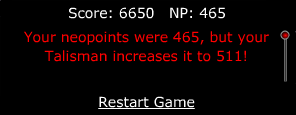
  • Green beads grant flash game bonusesWhen you receive the bonuses is random, but the amount you receive is based on how many beads you have: 10% for one bead, 25% for two beads, 50% for three beads, 75% for four beads, and 100% for all five beads.
LUTARI TALISMAN BONUSThe effects of blue beads and yellow beads are unknown. Here are some of the current theories:
    • increases the amount of training “super bonuses” you receive
    • increases the amount of random faerie quests you receive
    • increases strength of other bead perks
    • increase the amount of Random Events you receive
    • increases the chance of winning the “random” avatars

NOTES

  • While the Lutari Talisman icon appear on each user’s lookup, clicking it will redirect you back to your own talisman. You can only see which beads you own.
  • Based on the images above, you can tell that the beads appear on your talisman just as they do in your inventory. There is one glitch in relationship to this: if you add a Red Tongi Bead to your talisman, it will appear like a Red Matu Bead, and the same is true the other way around. No worries, they’ll both count for the right bead and you’ll still receive the perks since perks are awarded based on how many beads you have instead of which beads you have.
Last updated: 12/15/2024

Neopets Usuki Frenzy

Ever dreamed of rushing through your house to gather your favorite toys before an exciting trip? If not, now’s your chance to dive into the chaotic and thrilling world of Usuki Frenzy, a classic Neopets action game released on August 21, 2007. Join Lucie, an enthusiastic Usuki collector, as she scrambles to gather her prized Usuki Sets before heading to the highly anticipated Usuki Convention.

Usuki Frenzy

With only three minutes on the clock, Lucie’s house becomes a whirlwind of activity. Your mission? Help her locate all the items on her list across ten rooms while avoiding mistakes and racing against time. If you succeed, not only will Lucie make it to the convention on time, but you might also snag a coveted Usuki Frenzy trophy!

How to Play Usuki Frenzy

Game Objective
In Usuki Frenzy, you guide Lucie, a Cybunny, through her house to collect specific Usuki Sets and Usuki Dolls listed on the left side of the screen. Your goal is to pick up every listed item before time runs out, completing three increasingly challenging levels.

Usuki Frenzy Guide

Here’s how it works:

  1. Use the arrow keys (up, down, left, and right) to navigate Lucie through each room.
  2. Walk over an item to pick it up. If it matches the list, it will appear in full color on the left side of your screen.
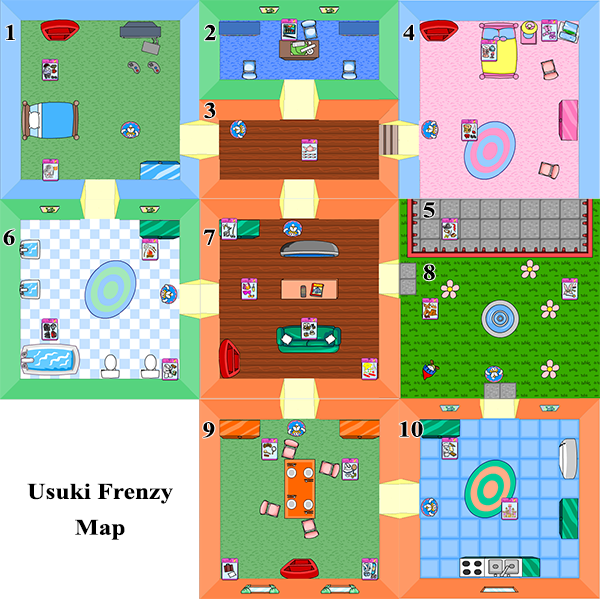
  3. If you pick up an incorrect item, a warning message will appear. You must return it to one of the four red bookcases (located in the pink bedroom, blue bedroom, living room, and dining room) before continuing.

The game has a total time limit of three minutes, which does not reset between levels. This means time management is crucial as you progress through each stage.

Usuki Frenzy Levels

The game features three levels, each increasing in difficulty:

  • Level 1: Collect 4 Usuki Sets.
  • Level 2: Collect 7 Usuki Sets.
  • Level 3: Collect 10 Usuki Sets.

The number of items increases with each level, but the total time remains fixed. Any remaining time from one level carries over to the next, so finishing earlier gives you more time to tackle the harder stages.


Scoring System in Usuki Frenzy

Scoring is straightforward but requires strategy to maximize points:

  • Correct Item: +15 points for each Usuki Set.
  • Usuki Dolls: +16 points for each doll collected (optional but adds extra points).
  • Time Bonus: At the end of each level, your remaining time is halved and added to your score. For example, if you finish a level with 72 seconds left, you earn a 36-point bonus.

Memorizing item locations is critical for high scores since items always spawn in the same rooms. Use this predictability to optimize your path and minimize wasted time.


All Usuki Sets and Dolls

There are 24 unique Usuki Sets and three collectible Usuki Dolls in the game. Below is the complete list and their locations:

Usuki Sets

  1. Snowy Valley Usuki Set
  2. Time For Tennis Usuki Set
  3. Tyrannian Usuki Set
  4. Usuki Bakery Set
  5. Usuki Beach Accessories
  6. Usuki Bedtime Clothing
  7. Usuki Clown Set
  8. Usuki Faerie Play Set
  9. Usuki Marshmallow Set
  10. Usuki Poetry Set
  11. Usuki Queen Set
  12. Usuki Scuba Diving Play Set
  13. Usuki Snowy Sweetheart Set
  14. Usuki Sushi Play Set
  15. Usuki Tea Set
  16. Usuki Travel Set
  17. Winter Love Usuki Set
  18. Winter Woolies Usuki Set
  19. Usuki Space Set
  20. Black Belt Usuki Set
  21. Fancy Usuki Sandcastle Set
  22. Fire Faerie Usuki Set
  23. Pirate Usuki Play Set
  24. Retro Usuki Hair Set

Usuki Dolls

  1. Magical Hair Usuki: Found in the living room (level 2) and dining room (level 3).
  2. Hula Girl Usuki: Appears in the kitchen on level 3.
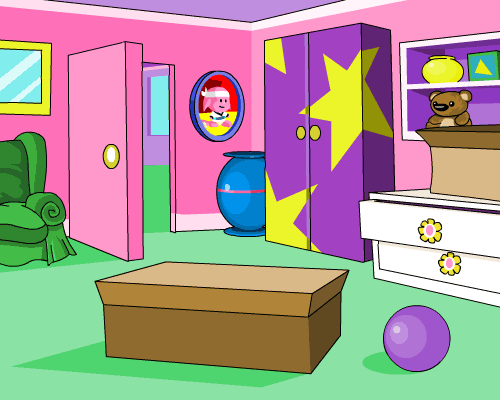
  3. Ballerina Usuki (Hidden): Found by pressing the spacebar while standing in front of the blue computer in Lucie’s room.

Room-by-Room Item Locations

Here’s a breakdown of all rooms and their corresponding items for easy reference:

Usuki Frenzy neopets
  • Blue Bedroom: Usuki Space Set, Usuki Pirate Set
  • Pink Bedroom: Usuki Snowy Sweetheart Set, Winter Love Usuki Set, Usuki Bedtime Clothing, Ballerina Usuki (Hidden Doll)
  • Office: Usuki Sushi Play Set
  • Bathroom: Black Belt Usuki Set, Usuki Marshmallow Set, Usuki Scuba Diving Play Set
  • Hallway: Usuki Tea Set
  • Living Room: Tyrannian Usuki Set, Usuki Beach Accessories, Usuki Clown Set, Winter Woolies Usuki Set, Magical Hair Usuki (Doll)
  • Dining Room: Retro Usuki Hair Set, Time for Tennis Usuki Set, Usuki Travel Set, Snowy Valley Usuki Set, Magical Hair Usuki (Doll)
  • Kitchen: Fancy Usuki Sandcastle Set, Usuki Bakery Set, Hula Girl Usuki (Doll)
  • Garden: Fire Faerie Usuki Set, Usuki Queen Set, Usuki Faerie Play Set
  • Balcony: Pirate Usuki Set

Pro Tips for Usuki Frenzy

  1. Diagonal Movement: Lucie moves faster when you press two arrow keys simultaneously, allowing diagonal movement. It can be tricky to control but is invaluable for saving time.
  2. Memorize Locations: Since items spawn in the same location every game, learning their placements will help you navigate efficiently.
  3. Avoid Mistakes: Picking up incorrect items slows you down, as they must be returned to a red bookcase. Be cautious when entering rooms, especially ones with cluttered entrances like the garden.
  4. Restart Strategically: If your initial item list requires excessive backtracking, consider restarting the game for a more favorable layout.

Hidden Secrets in Usuki Frenzy

The Ballerina Usuki Doll is the game’s only hidden item. To collect it, stand in front of the blue computer in Lucie’s room and press the spacebar. Sometimes, pressing the up arrow while doing this helps. This trick works once per game and can be done at any level. Pro players recommend grabbing the doll when near the pink bedroom for better score optimization.

884_1-2194712

Conclusion: How to Win at Usuki Frenzy

Winning at Usuki Frenzy requires a mix of memorization, speed, and precision. By learning item locations, utilizing diagonal movement, and avoiding unnecessary mistakes, you can achieve a high score and even a trophy.

With these tips and a bit of practice, you’ll help Lucie pack her favorite toys in record time and make it to the Usuki Convention without a hitch. Now, grab your keyboard and start your Usuki adventure—those shiny trophies are waiting!

Last updated: 12/15/2024

Neohomes 2.0 Guide

Neohomes 2.0 is a revamped housing system for the denizens of Neopia. Existing alongside the original Neohomes system, Neohomes 2.0 adds a plethora of fun and useful features that allow you to customize your home to your heart’s delight. Most importantly, the Neohomes 2.0 system introduces Neocash items for home decoration, and allows you to actually place your pets and their petpets inside of their homes!

neopets neohome

GETTING STARTED WITH YOUR NEOHOME

To begin building the Neohome of your dreams, you’ll want to access the Neohomes section of the site, with a link conveniently located in the Customize section of your navigation bar. Once you are in the Neohomes section, you will see several options: Shops, NC Mall, FAQ, Board, Spotlight, and Classic.

The six areas of the Neohomes section on the right side of the menu are fairly self-explanatory. The Shops will sell you furnishings and other decorative items for Neopoints, while the NC Mall Shops will do the same for NC. The FAQ will set you straight on commonly-asked questions about Neohomes, while the Board gives you a place to ask new questions and discuss Neohomes with the larger community. At the end of our menu is the Spotlight, which showcases some of the finest homes around, and finally, Classic Neohomes, which gives you access to the old Neohomes 1.0. features.

To begin planning your own beautiful new Neohome 2.0, click the Create A New Neohome button located on the bottom left side of the menu, below the preview picture!

Before you begin to break ground on your new home, you must select the area of Neopia that you wish to build your new home in – use the preview menu (shown below) to select an area and see what it will look like in the viewer to the left. Choose carefully – once you select your building area, you cannot change where your house is located!

Once you’ve selected the area you wish to build in, press the Create This Neohome button, and watch as your new home becomes a reality!

FIRST STEPS WITH YOUR NEOHOME

Now that you’ve constructed your new Neohome, it’s time to build it into a comfortable (and fashionable?!) place for you and your pet to enjoy. To help you on this path, you are provided with one of five Starter Packs of furniture to begin your collection. These packs come in one of five colors – red, blue, yellow, green, or purple – and are made up of various furniture, floors, and decorative items to fill your new Neohome with. The items in this starter pack, as well as any future items that you may obtain, are placed in your Storage Shed, similar to how wearable items for your pet are placed in your Closet. To purchase additional items to stock your Shed, head over to either the Shops or the NC Mall, both conveniently accessible from their respective buttons on the Neohomes Menu.

GETTING DOWN TO DECORATING YOUR NEOHOME

Once you’ve shopped until you’ve dropped and you’re ready to start turning the contents of your Shed into a lovely home, it’s time to start decorating! From the Neohomes menu, press the Customize My Neohome button to launch the Neohome editor. For first time users, there is a handy tutorial to show you the ins and outs of navigating the editor. In short, items from your Shed appear on the bottom menu, which contains three tabs: Items (Furniture, Decorations), Materials (Floors, Walls), and Pets.

To decorate with furniture, open the tab (marked with a chair) and drag items from the bottom bar up to the top screen. Once items are on the top part of the screen, they can be dragged around to re-position them.

Clicking an item opens up a menu that will allow the item to be rotated, raised, or lowered, depending on its position in the room. Certain items, like tables and lamps, will need to occupy the same ‘space’ but be raised / lowered apart from one another to create the illusion that the lamp is resting on top of the table, for example.

To decorate with materials, open the tab (marked with a hammer) and click the pattern you are looking to decorate your walls or floor with. Selecting the pattern changes your cursor into a paint-roller icon! With this roller, click and drag your cursor across the surfaces to be decorated, depending on if you are painting your walls or installing new flooring.

You will see yellow selection boxes spring up to highlight the areas of your home that you are about to decorate. Release your mouse button and watch as your pattern fills your home! Doors, windows, and other wall decorations are also located in the Materials tab, and are placed similarly to furniture.

You may have noticed that you can edit the outside of your house as well as the inside of the house – there are restrictions as to what can be placed outside, but simple furniture can be added to spruce up your landscaping! To switch between the inside and outside, use the large blue button on the middle-left side of the screen.

When you are ready for your Neopets (and their petpet!) to move into their new home, click the Pet tab (marked with a Kacheek) and drag your pets into place. They can be raised and lowered in the same way that other items can be, to position them to sit on beds, chairs, couches, and tables.

When you are done decorating, don’t forget to Save your changes by clicking the floppy-disk icon on the lower right hand side!

NEOHOME SPOTLIGHT TROPHY

Now that you’ve bled and sweat to build the perfect Neohome, why not reap the rewards of your hard work? Master decorators and creative construction workers can submit their Neohome projects to the Spotlight contest by filling out a simple application. First, use the Snapshot Mode button (marked with a blue camera) in the top right corner of the Neohome Customization window. Adjust your view using the arrows in the top left of the screen, then click the snapshot window to take a photo! This photo will become the default image of your Neohome for all associated menus, as well as your Contest Entry!

Once you’ve captured a picture of your Neohome that you think shows off all your hard work, type a quick description and caption into your application and send it off! Once per week, a winner is selected from all the entries and that Neohome is awarded with a place on that week’s Spotlight page! For your efforts, your account will also be awarded the coveted Golden Neohome trophy!

People in gold houses shouldn’t throw trophies…

Notes

  • Although the initial items in your Starter Pack are not able to be traded, you can purchase any of the items from the five sets at the Neohomes Superstore! Collect them all!
  • Once you have submitted an application for the Neohome Spotlight, clicking the application link in future weeks will re-submit your application for the next contest. If at first you don’t succeed, try again!
Last updated: 12/15/2024